Learn the differences between Residential, Datacenter, and Mobile proxies.
Compare Residential, Datacenter, and Mobile proxies. Learn how proxy IP types work, how websites detect them, and which option is best for privacy, automation, scraping, and multi-accounting.

Paul Jackson
Technology editor
When choosing a proxy, many users focus on the protocol itself — HTTP or SOCKS5.
In reality, websites often pay much more attention to the type of IP address behind the proxy than to the protocol being used.
Two proxies may both work through SOCKS5, yet one passes verification without issues while the other immediately encounters CAPTCHA challenges, additional checks, or account restrictions.
The reason is usually simple: the IP addresses come from different types of networks.
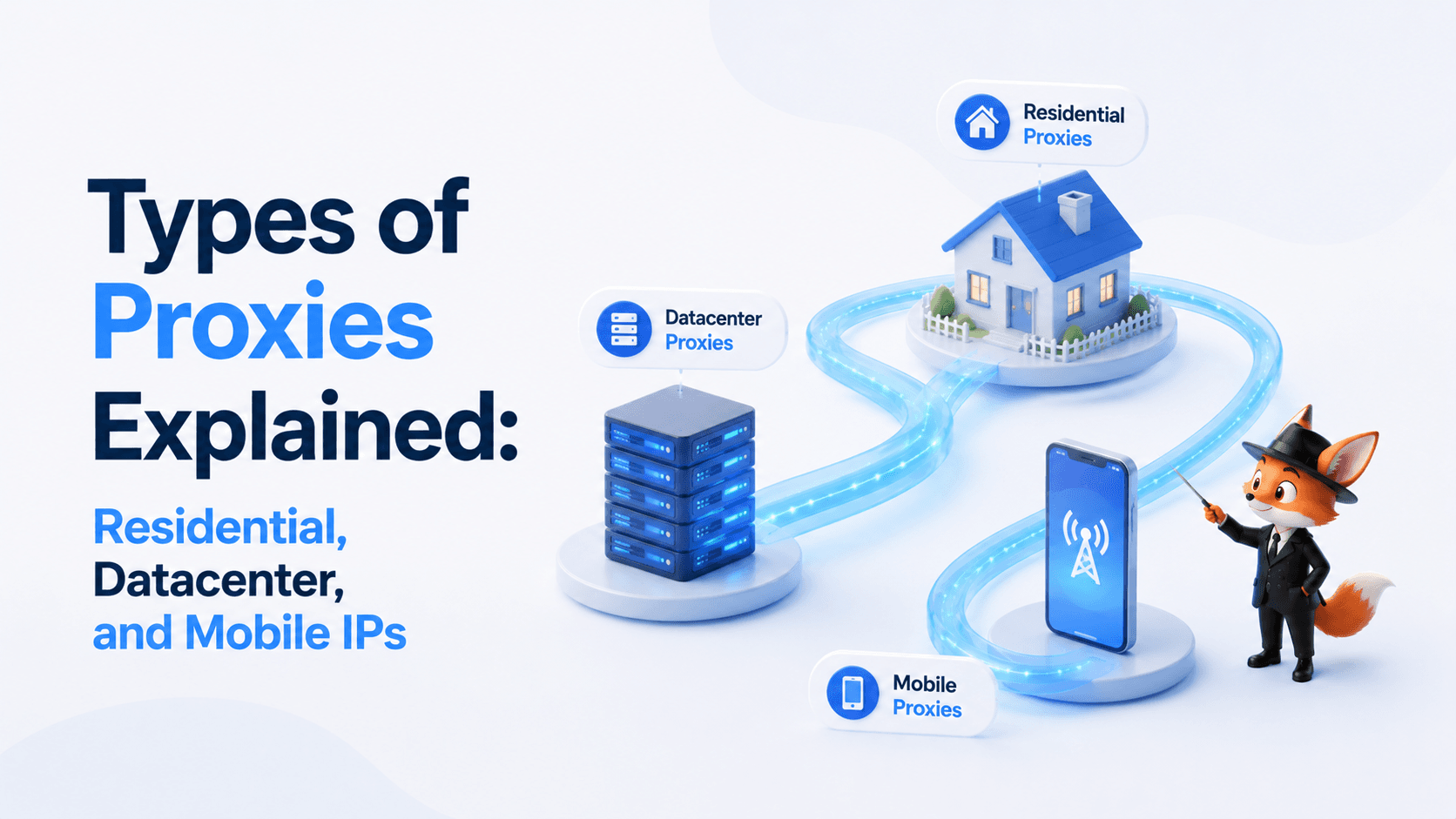
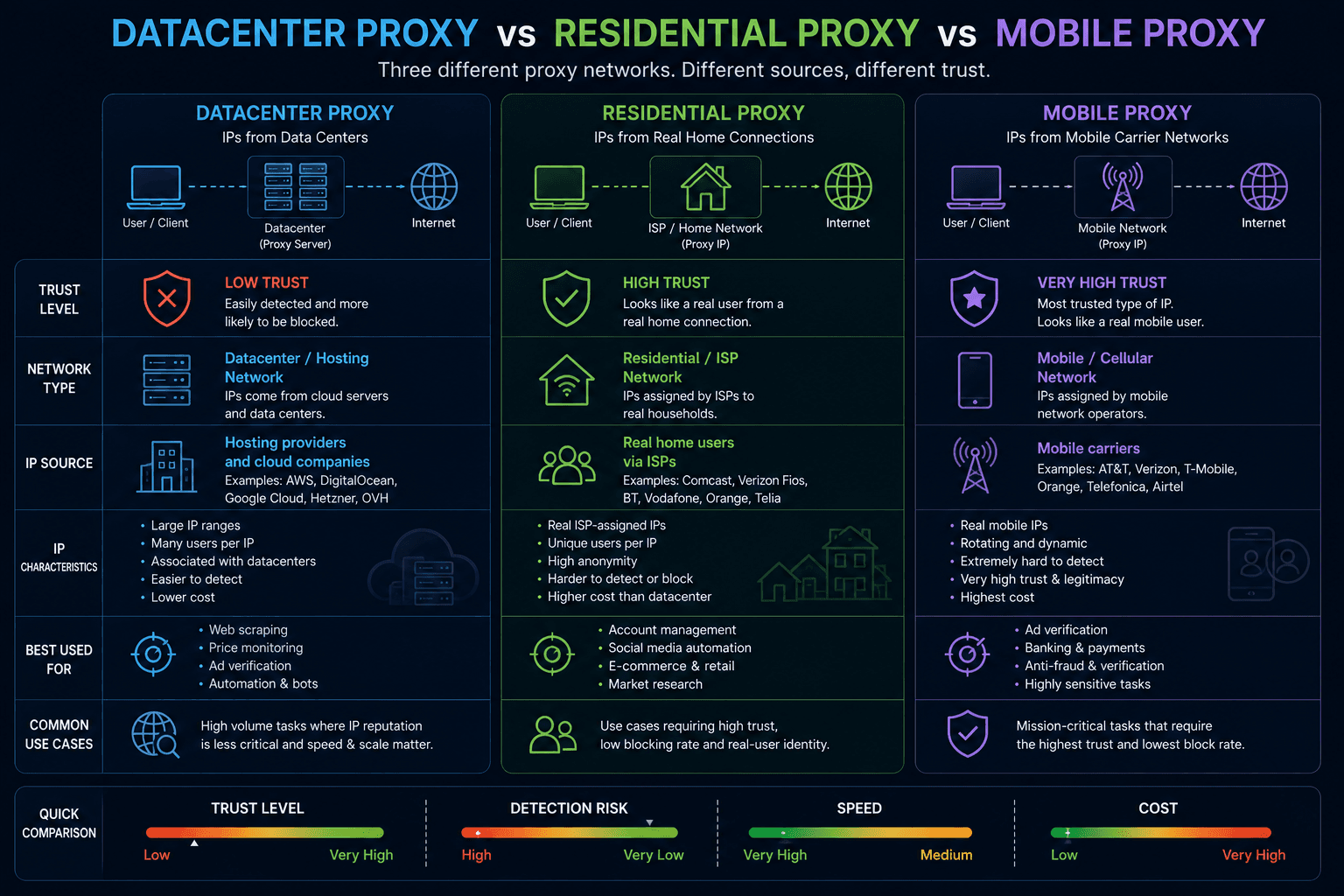
Understanding the difference between Datacenter, Residential, and Mobile proxies makes it much easier to choose the right option for your task.
Proxy protocols: HTTP and SOCKS5
Before looking at IP types, it’s worth briefly covering the two protocols most commonly used with proxies.
HTTP Proxy
HTTP Proxy is designed primarily for web traffic.
It works well with:
- HTTP websites;
- HTTPS websites;
- browser-based applications.
For everyday browsing and many simple tasks, HTTP Proxy is often all that’s needed.
SOCKS5 Proxy
SOCKS5 operates at a lower network level and supports a much wider range of traffic.
It is commonly used with:
- anti-detect browsers;
- automation tools;
- desktop applications;
- scraping software;
- messaging clients.
Some SOCKS5 servers also support UDP Associate, allowing UDP traffic to pass through the proxy.
For a detailed comparison, see:
SOCKS5 vs HTTP Proxy: Which One Should You Use?
Datacenter Proxies
Datacenter proxies use IP addresses owned by hosting companies, cloud providers, and server infrastructure operators.
These IPs typically originate from:
- cloud platforms;
- VPS providers;
- dedicated servers;
- hosting companies.
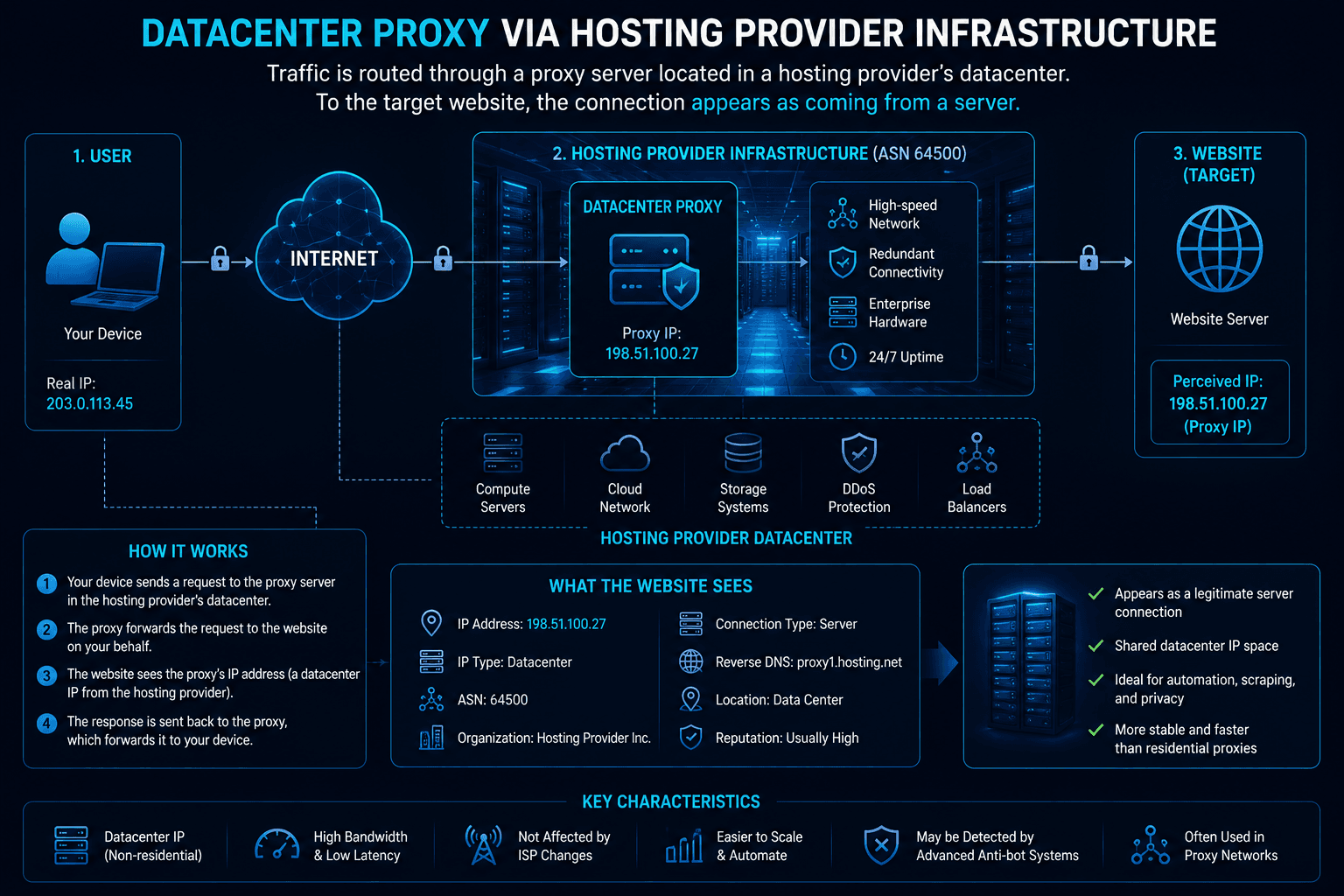
To websites, these addresses usually look like server traffic rather than traffic from a typical home user.
Advantages
- high speed;
- stable connections;
- affordable pricing;
- large availability.
Disadvantages
- easier to identify;
- lower trust scores on some platforms;
- more likely to trigger CAPTCHA challenges;
- frequently associated with automation.
Many modern anti-fraud systems can identify datacenter networks by analyzing ASN ownership and IP reputation.
For more information, see:
What Is an ASN (Autonomous System Number) and Why Websites Care?
Residential Proxies
Residential proxies use IP addresses assigned by ordinary internet service providers.
From a website’s perspective, they look like normal home internet connections used by real people.
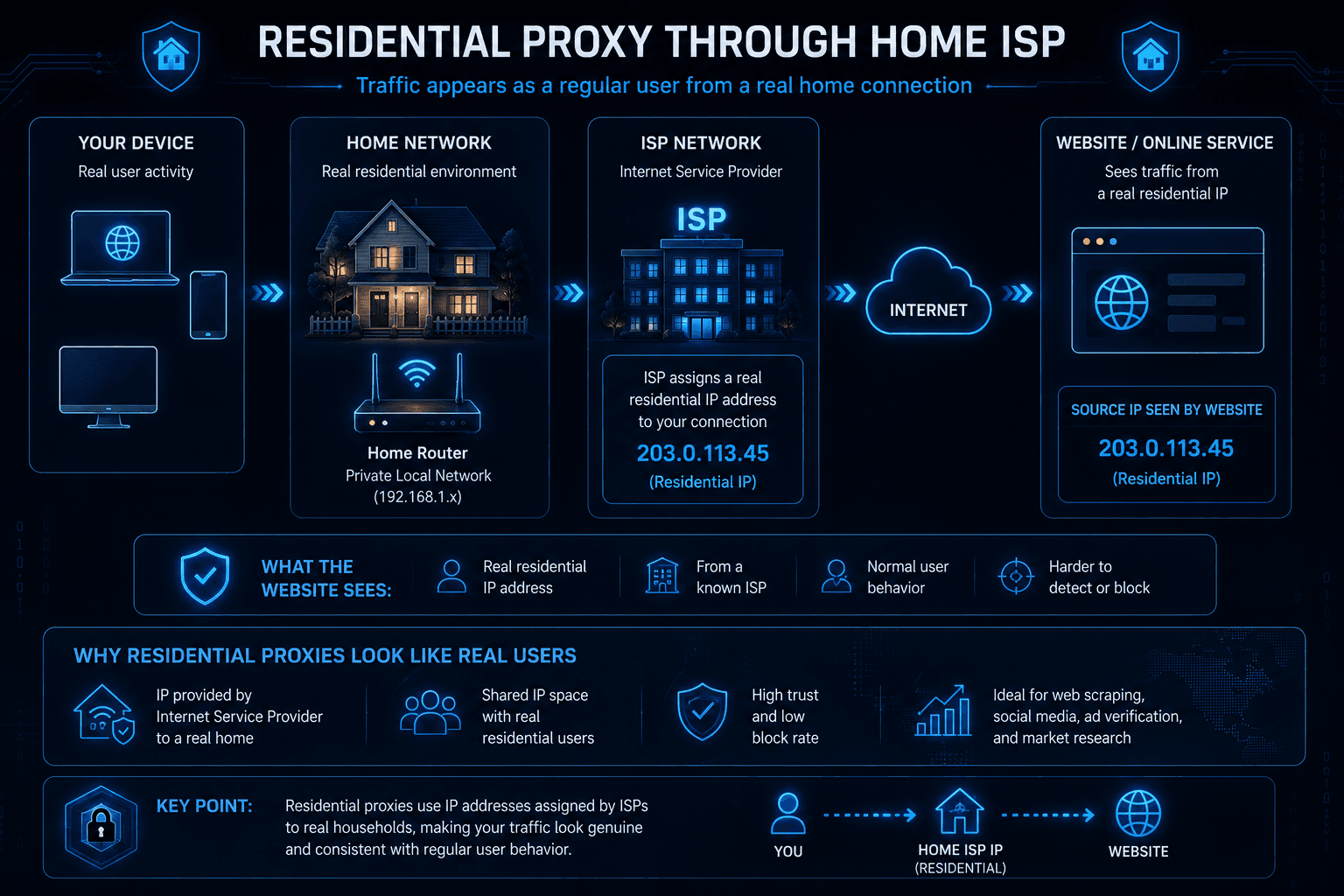
This is one reason residential proxies are often preferred for sensitive platforms and anti-fraud-heavy environments.
Advantages
- resemble ordinary consumer traffic;
- generally receive higher trust;
- work well on strict platforms;
- often trigger fewer anti-fraud checks.
Disadvantages
- higher cost;
- commonly billed by traffic usage;
- speed may be lower than datacenter proxies.
It’s important to understand that a residential IP is not automatically trusted. IP reputation still matters, and heavily abused residential addresses can also attract additional scrutiny.
Mobile Proxies
Mobile proxies use IP addresses provided by cellular operators.
Unlike residential networks, mobile networks often rely on Carrier-Grade NAT (CGNAT), where many users share the same public IP address simultaneously.
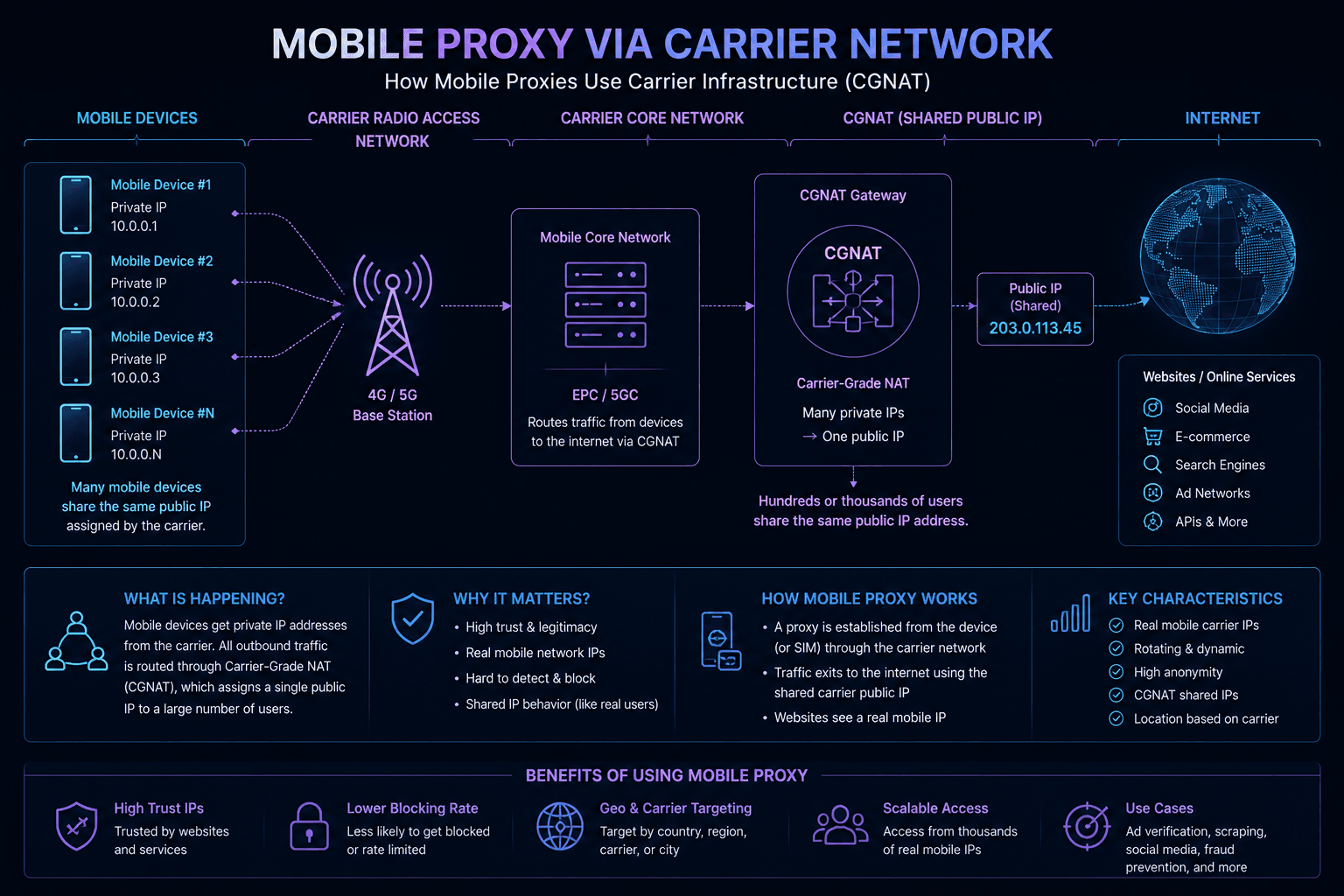
Because hundreds or even thousands of devices may appear behind the same address, many anti-fraud systems treat mobile traffic differently from other network types.
Advantages
- very high trust levels;
- difficult to block at scale;
- commonly associated with real users.
Disadvantages
- expensive compared to other proxy types;
- fewer available locations;
- IP stability may vary;
- smaller pools than large residential networks.
For some highly sensitive platforms, mobile proxies are often considered the closest thing to ordinary consumer traffic.
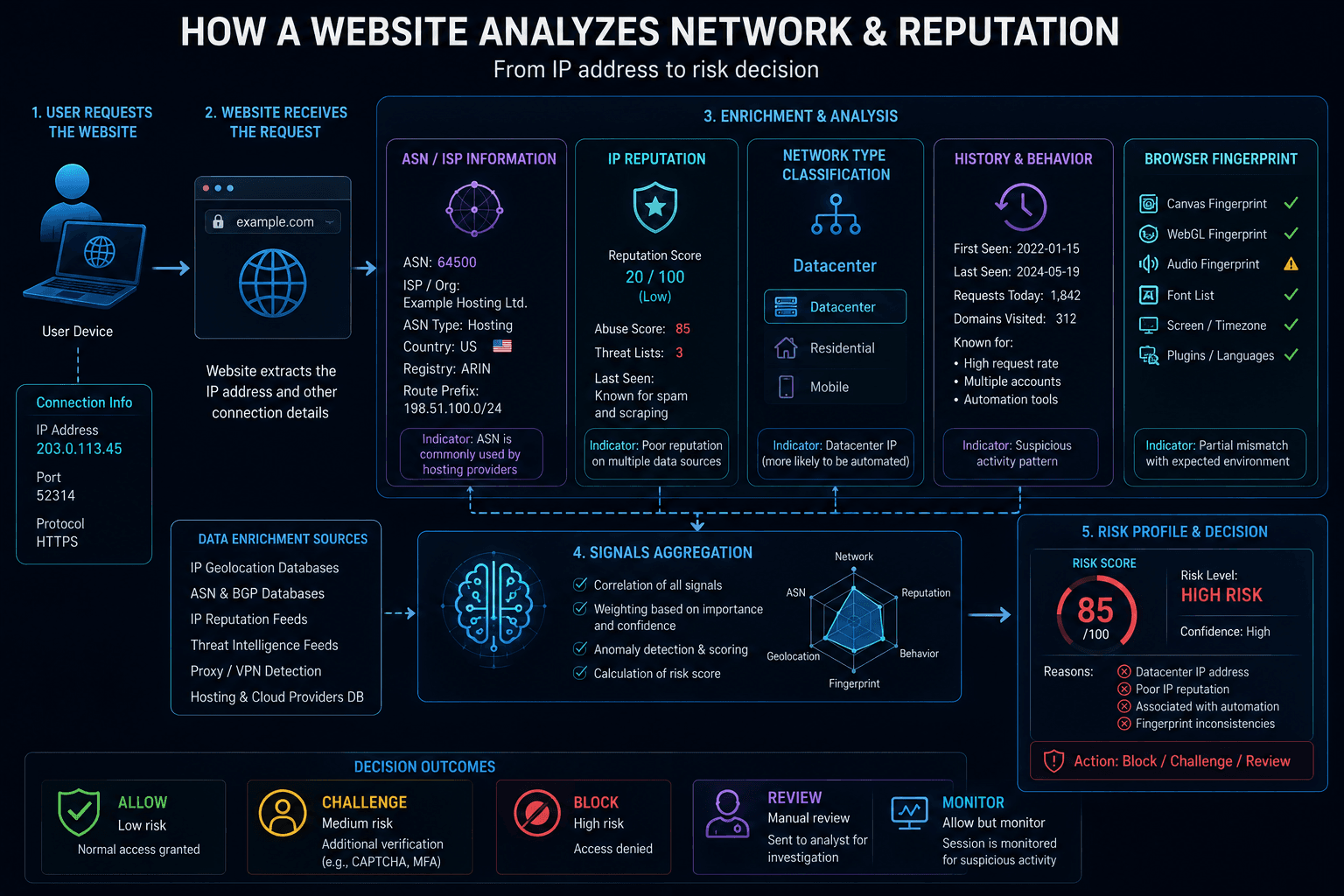
How websites determine IP type
Modern websites rarely evaluate only the IP address itself.
Instead, they collect additional information about the network behind it.
Common signals include:
- ASN ownership;
- IP reputation;
- network classification;
- historical activity;
- provider information.
Using these signals, a platform can often determine whether traffic comes from:
- a residential ISP;
- a hosting provider;
- a cloud platform;
- a mobile carrier.
This information is frequently combined with Browser Fingerprints and other anti-fraud indicators.
For a deeper explanation, see:
- What Is an ASN (Autonomous System Number) and Why Websites Care?
- What Is IP Reputation and Why Does It Matter?
Choosing the right proxy
There is no single proxy type that works best for everything.
The ideal choice depends on the platform you’re using and the level of scrutiny applied to incoming traffic.
For everyday browsing
Datacenter proxies are often sufficient.
They are fast, inexpensive, and widely available.
For scraping and automation
Both Datacenter and Residential proxies can work.
The decision usually depends on how aggressively the target website detects automation.
For anti-detect browsers and multi-accounting
Residential proxies are often preferred because they typically receive higher trust scores.
For highly sensitive platforms
Residential and Mobile proxies generally provide the most natural-looking traffic.
Proxy Best Practices for WadeX
When working with anti-detect browser profiles, proxy quality is often just as important as Browser Fingerprint configuration.
Several best practices are commonly recommended:
- use a separate proxy for each profile;
- keep geolocation consistent across browser settings and IP address;
- avoid sharing one IP across multiple unrelated accounts;
- verify ASN, DNS, and geolocation before use;
- prefer Residential IPs for sensitive platforms.
A simple rule that many experienced users follow is:
One proxy = one browser profile.
Wade Proxy: residential proxies inside WadeX
In addition to supporting external proxies, WadeX includes access to Wade Proxy
Wade Proxy is a residential SOCKS5 proxy service available directly inside the browser.
Unlike traditional proxy providers, it is not intended for standalone use. Proxy traffic is purchased separately from the WadeX subscription and can only be used within WadeX profiles.
The service offers:
- residential IP addresses;
- a pool of more than 60 million IPs;
- coverage across 190+ countries;
- country selection;
- city selection where available;
- IP rotation on demand;
- traffic-based billing.
All proxy management is handled directly through the WadeX interface, and proxy configurations cannot be exported for use in third-party applications.
Current limitation: UDP is not supported
At the time of writing, Wade Proxy supports standard web traffic but does not support UDP forwarding.
This means:
- HTTP works normally;
- HTTPS works normally;
- most websites function without issues;
- QUIC and HTTP/3 are unavailable through Wade Proxy;
- SOCKS5 UDP Associate is not supported.
If your workflow depends on:
- UDP traffic;
- QUIC;
- HTTP/3;
- WebRTC-heavy applications;
- software requiring UDP forwarding,
you will need a third-party SOCKS5 provider that explicitly supports UDP Associate.
Which proxy type should you choose?
Each proxy category has its own strengths.
Datacenter proxies are fast and affordable.
Residential proxies generally provide higher trust and look more natural to websites.
Mobile proxies often receive the highest trust levels but are usually the most expensive option.
For most users, the right choice depends on the platform they work with and how aggressively that platform evaluates incoming traffic.