Why Cloudflare Shows CAPTCHA and Blocks Access
Why websites show CAPTCHA, how Cloudflare evaluates connection risk, and what can cause access blocks

Paul Jackson
Technology editor

Sometimes, instead of the page you expected, you suddenly get a CAPTCHA, an additional browser check, or even an access denied message. Many users notice this happening more often after connecting through a VPN or proxy server.
The obvious conclusion is that the website has detected and blocked the VPN. In practice, things are rarely that simple.
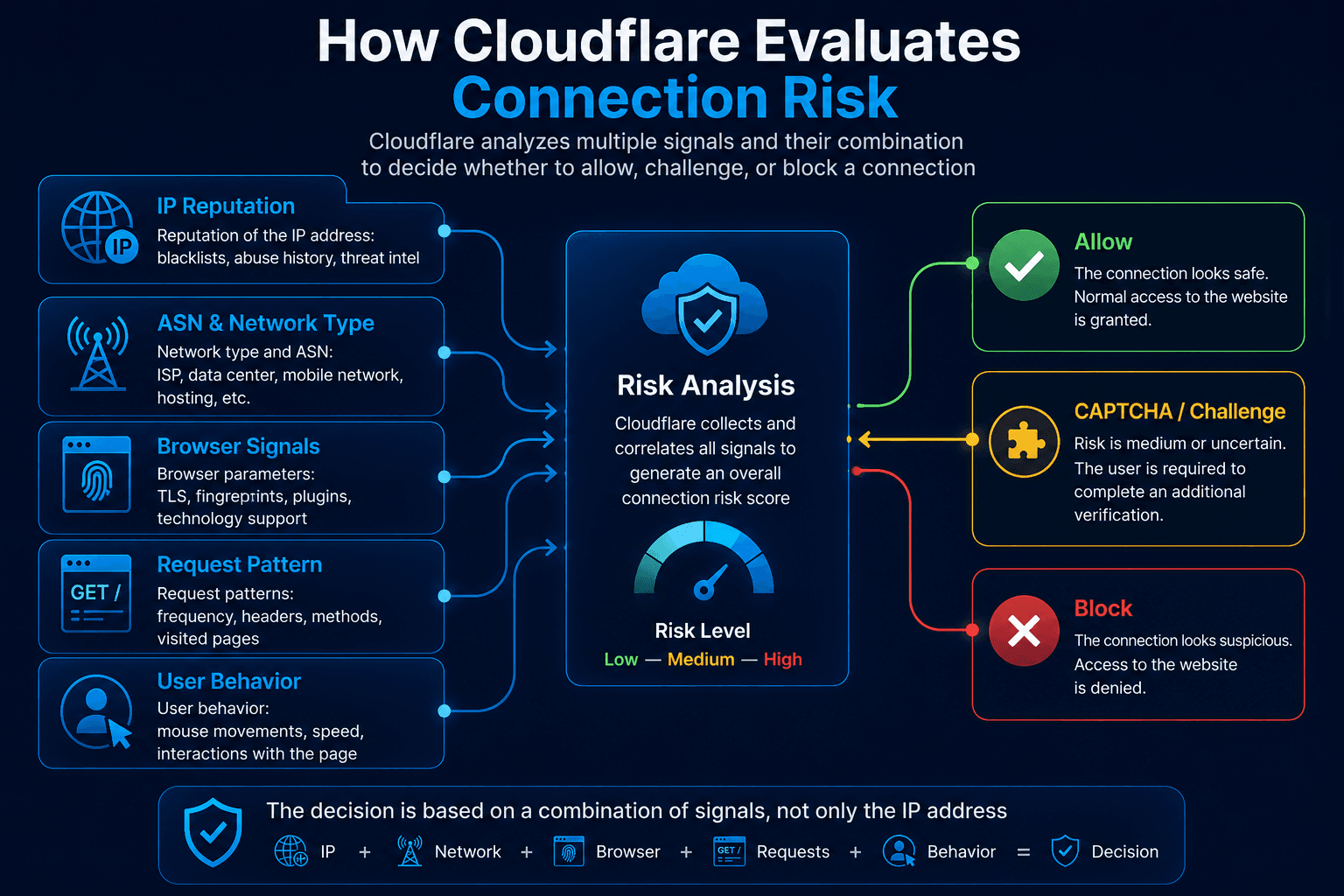
Security systems such as Cloudflare can evaluate a connection using multiple signals. IP reputation, network characteristics, request patterns, browser parameters, and other factors may all contribute to the final decision. If the combination looks suspicious, the website may ask the visitor to complete an additional check.
So why does CAPTCHA appear, what role do VPNs and browser fingerprints play, and what can you check if challenges keep appearing?
Why Does Cloudflare Show CAPTCHA?
Websites use Cloudflare to protect themselves against DDoS attacks, automated requests, scraping, and other unwanted activity. The decision to challenge a visitor, however, usually isn’t based on a single parameter.
Depending on the website and its security configuration, the system may consider:
- IP address reputation;
- ASN and network type;
- frequency and pattern of requests;
- cookies and previous interactions with the website;
- browser characteristics;
- JavaScript execution;
- signals associated with client behavior.
The exact checks depend on the protection mechanisms enabled by the website.
If a connection doesn’t raise concerns, the page normally opens without interruption. When the perceived risk is higher, the visitor may receive a CAPTCHA or another type of challenge. In some cases, access can be blocked entirely.
Why Does CAPTCHA Appear More Often When Using a VPN?
Connecting through a VPN doesn’t automatically mean that Cloudflare will challenge you. Quite often, the issue is the IP address assigned to the VPN server.
A single VPN IP may be shared by dozens or even hundreds of users. If some of them generate large numbers of requests, run automated tools, or engage in other activity that websites consider suspicious, the reputation of that address can deteriorate.
The next person using the same server may then encounter CAPTCHA challenges despite doing nothing unusual themselves.
This is particularly common with free VPN services and public proxies. Their addresses are used by large numbers of unrelated users, which increases the chance of ending up with an IP that already has a poor reputation.
Your IP Address Isn’t the Only Signal
Changing your IP can sometimes solve the problem, but it won’t work in every case.
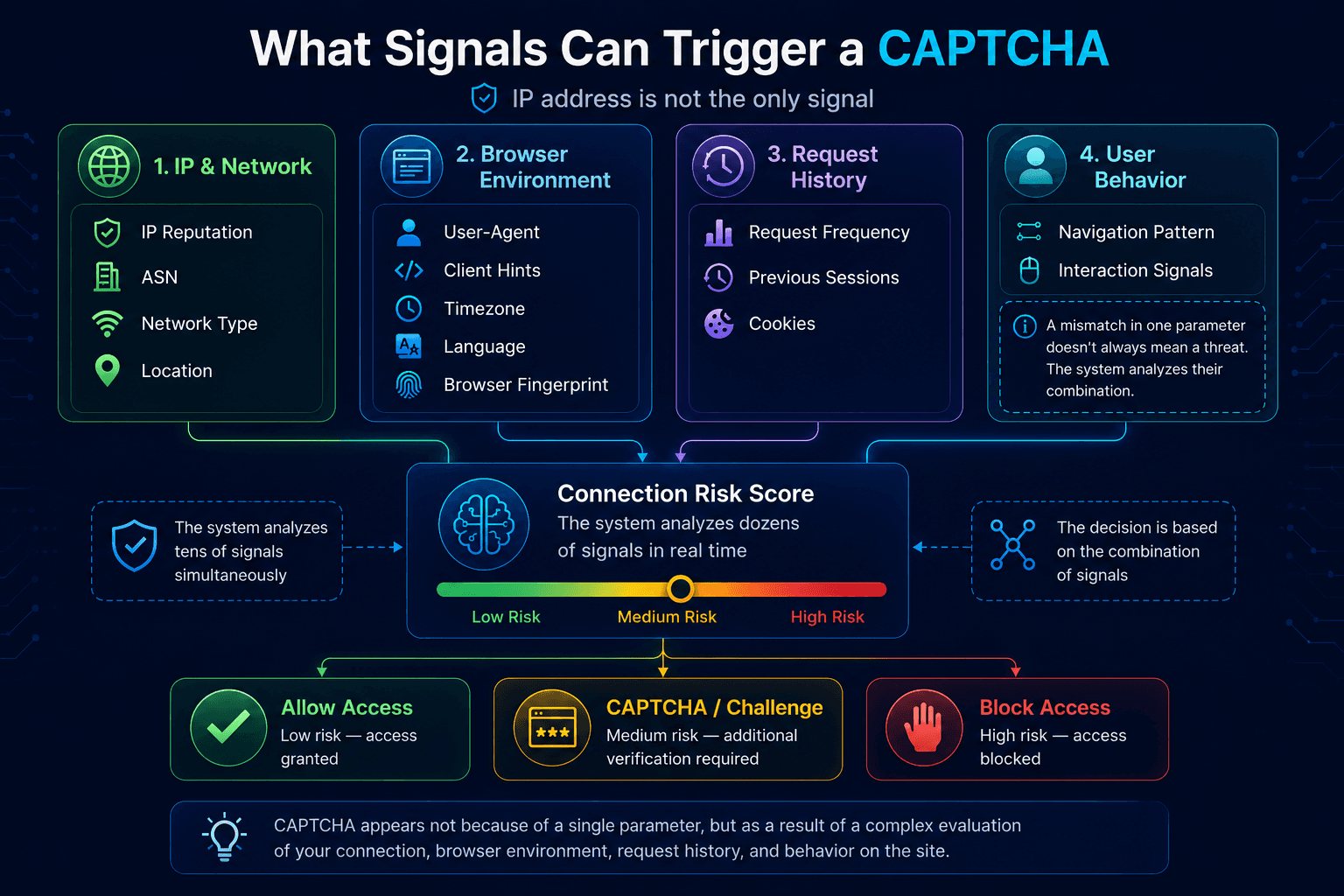
Security systems may compare information about the network, browser, and current session. For example, a connection can look unusual when the IP geolocation points to one country while the browser language and system timezone suggest a completely different region.
The browser itself can provide additional signals. These may include the User-Agent, Client Hints, supported browser features, and other technical parameters.
A single mismatch doesn’t necessarily result in a block. Risk assessments are generally based on a combination of signals, and the rules can vary considerably from one website to another.
What Role Does Browser Fingerprinting Play?
Browser fingerprinting provides websites and security systems with additional information about a visitor’s software and hardware environment.
Depending on the techniques being used, this may include:
- User-Agent and Client Hints;
- screen and device characteristics;
- Canvas and WebGL data;
- supported browser features;
- certain properties of the JavaScript environment.
A browser fingerprint shouldn’t be treated as the sole or primary reason for a CAPTCHA. It is one group of signals among many.
Problems may become more likely when the browser environment changes constantly or when its parameters don’t fit together naturally. This can be particularly relevant when managing multiple accounts or separate browser sessions.
For these workflows, specialized antidetect browsers such as WadeX can be used to create isolated browser profiles and manage the environment of each profile separately. Combined with a suitable proxy, each profile can operate as an independent workspace with its own network and browser configuration.
That doesn’t mean an antidetect browser guarantees a CAPTCHA-free experience. Websites can still evaluate IP reputation, request frequency, cookies, previous interactions, and many other signals.
What to Check If CAPTCHA Keeps Appearing
Start with your current network connection.
You can use Whoer.net to check your public IP address, DNS, WebRTC, and other connection parameters. This can help identify network leaks or obvious inconsistencies.
If CAPTCHA challenges started immediately after connecting to a VPN, try another server. The current IP may have a poor reputation, or the website may already be receiving an unusually high number of requests from that address.
Avoid switching between dozens of IP addresses within a short period. Constantly changing addresses during the same session can itself look unusual.
How to Reduce CAPTCHA Challenges and Blocks
There is no way to eliminate CAPTCHA completely because the website ultimately decides when an additional check is required. Still, a few practical changes can reduce how often challenges appear.
Try Another VPN Server
If IP reputation is the problem, changing servers may be enough to resolve it. A stable VPN connection is generally preferable to constantly rotating through random free proxies.
If you use WhoVPN, try connecting through another available server and check whether the website behaves differently.
Check Your Connection for Leaks
A VPN should route your traffic consistently. If some connections go through the VPN while others use your regular Internet connection, a website may receive conflicting network signals.
Check your IP address, DNS, and WebRTC. If you discover a DNS leak, fix it before testing the website again.
Don’t Disable JavaScript Unless Necessary
Modern security systems often rely on JavaScript to evaluate the browser and complete challenge mechanisms.
If JavaScript is disabled entirely, the check may simply fail to complete. The result can be an endless challenge loop or a website that never becomes accessible.
Keep Your Browser Environment Consistent
If you use a regular browser, avoid constantly changing the User-Agent or installing multiple extensions that modify the same browser parameters.
When working with several independent profiles, a dedicated solution can make session separation easier. In WadeX, each profile is isolated and can maintain its own browser environment. This helps keep working sessions separate and reduces accidental mixing of data between profiles.
Proxies are typically used to provide separate network connections for these profiles. The quality and reputation of the selected IP, however, remain just as important as the browser configuration itself.
What Usually Doesn’t Help
Constantly switching IP addresses is rarely a good strategy. The same applies to random free proxies, especially when their addresses have already been heavily used for automated traffic.
Disabling every available browser feature can also backfire. An unusually restricted browser configuration may stand out more than a normal one.
It is more useful to treat CAPTCHA as a sign that the website has decided to perform an additional check on the current connection. If challenges appear constantly, examine the IP and its reputation, network leaks, browser environment consistency, and your request patterns one by one.