What Happens When You Open a Website? From DNS Lookup to Page Load
Follow a website request from DNS lookup to the page appearing in your browser. We explain how TCP or QUIC, TLS, HTTP, CDNs, and page rendering fit together.

Paul Jackson
Technology editor
Opening a website feels almost instantaneous.
You enter a URL, press Enter, and within a second the page appears.
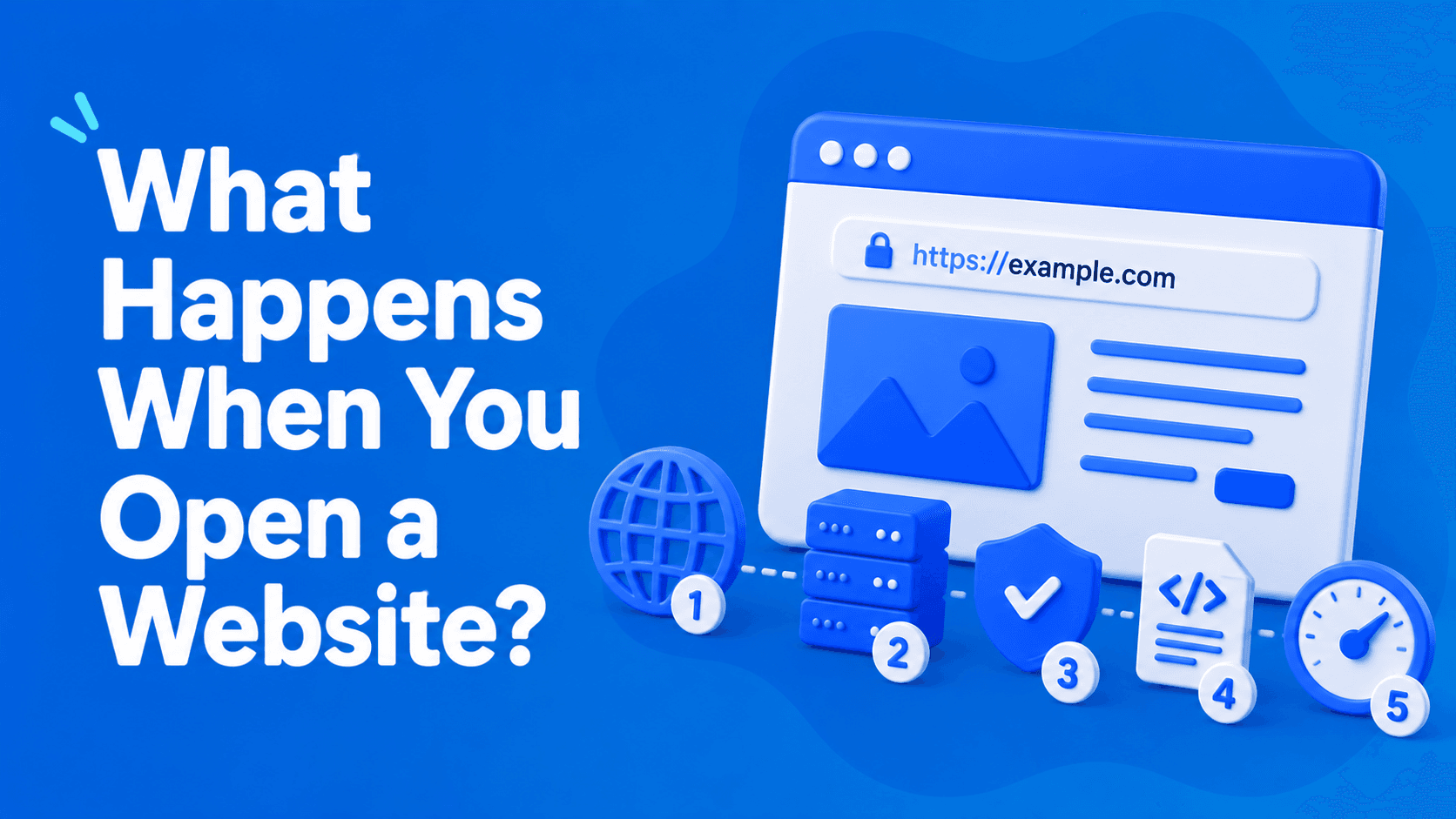
Behind that seemingly simple action, however, your browser performs a surprisingly long chain of operations. It has to locate the server, establish a connection, negotiate encryption, request the necessary files, and finally build the page you see on the screen.
Each stage takes only milliseconds, but together they determine how fast, secure, and reliable a website feels.
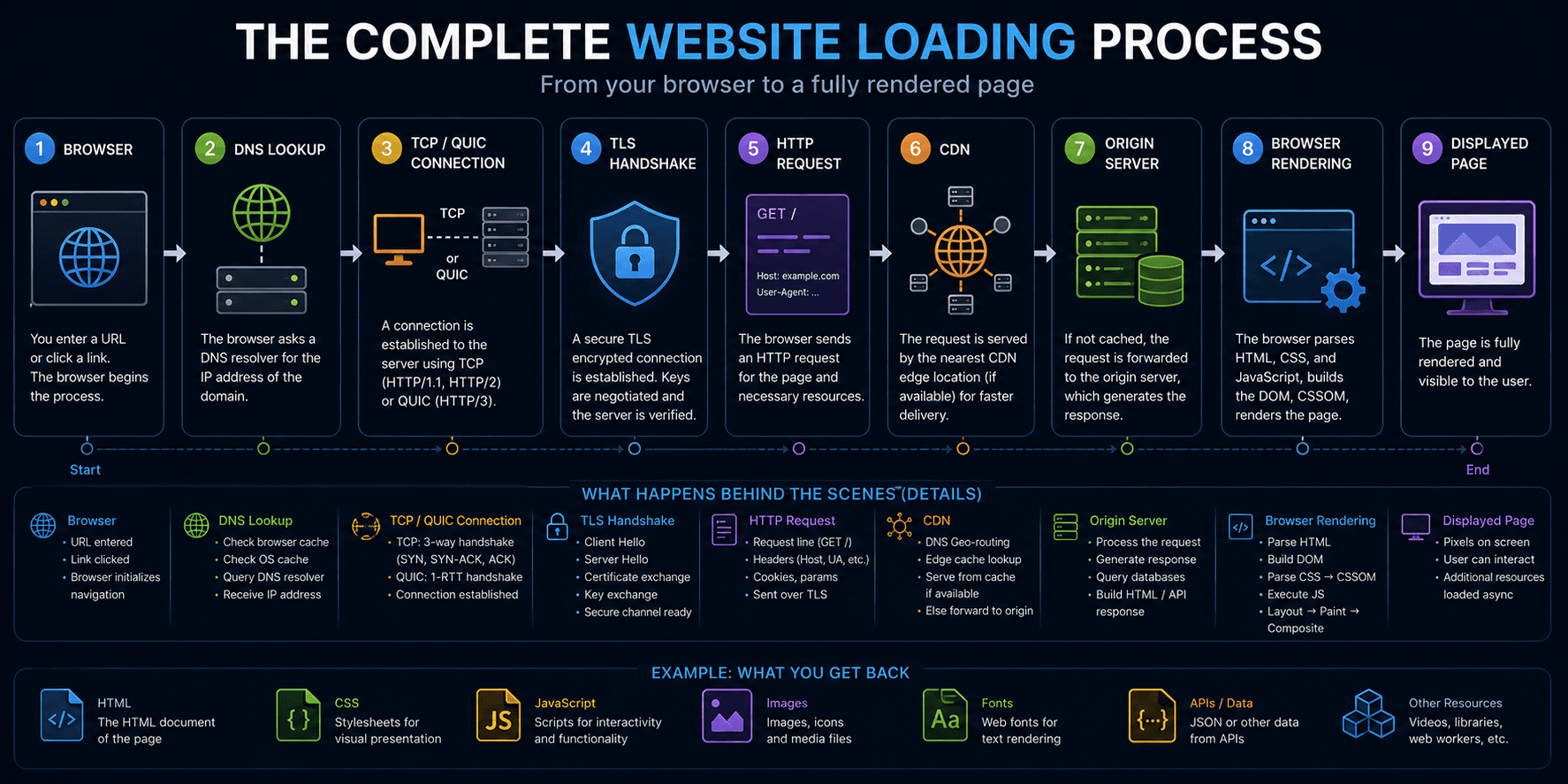
1. Entering a URL
Imagine you type:
At this point, the browser knows only the domain name.
It still needs to determine:
- the website’s IP address;
- which server should receive the request;
- whether HTTP/3 is supported;
- which CDN node is closest to you;
- how the connection will be established.
Before any data can be downloaded, all of these questions must be answered.
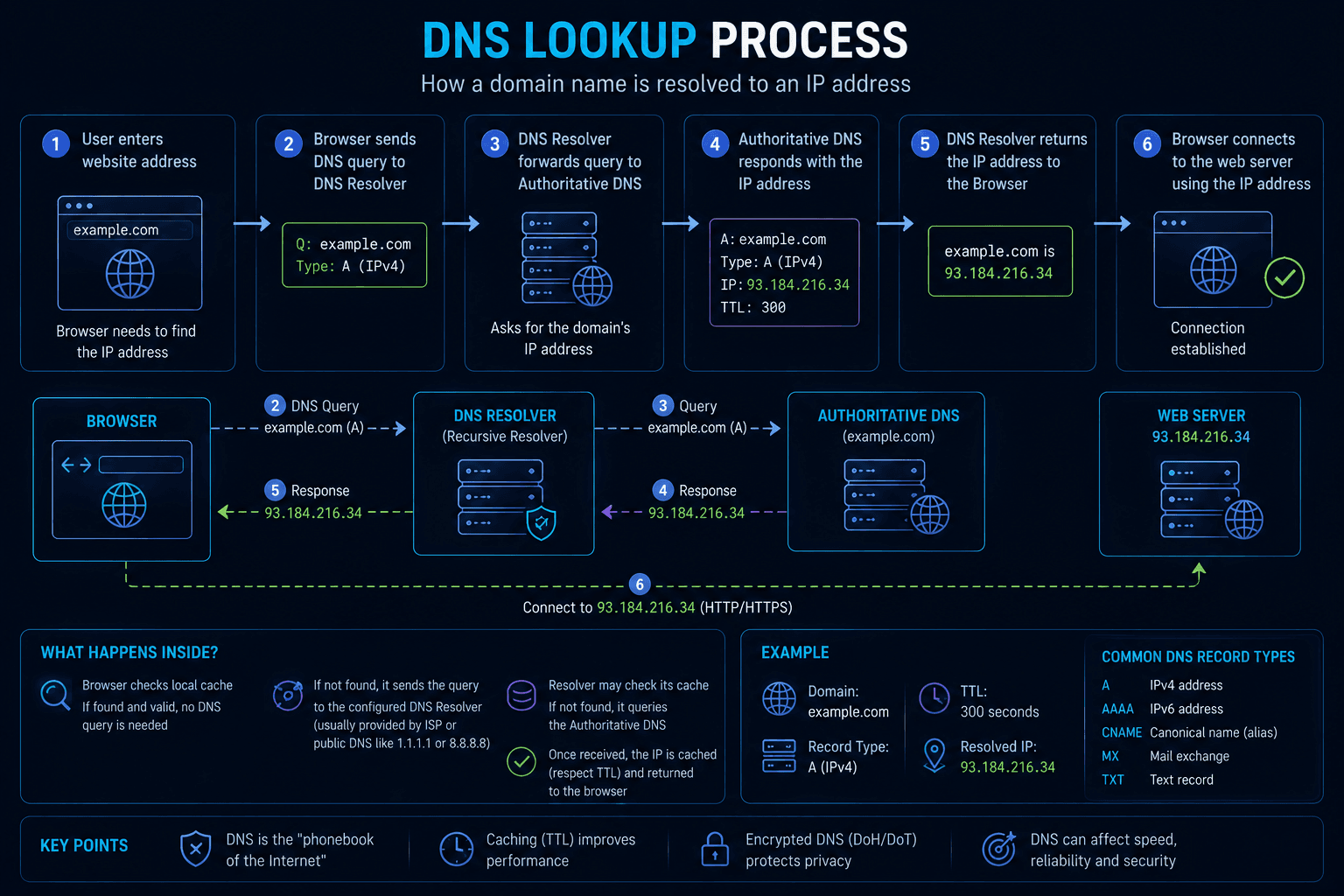
2. DNS Lookup
The first task is converting the domain name into an IP address.
The browser doesn’t immediately contact external DNS servers. It first checks whether the answer is already available locally:
- browser DNS cache;
- operating system cache;
- previously stored DNS records.
If no cached record exists, the request is sent to a DNS resolver, which eventually returns the correct IP address.
3. Choosing the connection method
Once the browser knows where the website is located, it decides how to connect.
The transport protocol depends on what the server supports:
- HTTP/1.1 and HTTP/2 use TCP;
- HTTP/3 runs over QUIC, which is built on UDP.
The selection happens automatically without any user interaction.
4. Establishing the connection
The browser now creates a connection with the server.
If TCP is used, a standard TCP Handshake takes place.
If the website supports HTTP/3, QUIC performs connection establishment while integrating part of the security negotiation, reducing the number of network round trips.
Although this stage usually lasts only a fraction of a second, it has a direct impact on page loading time.
5. TLS Handshake
Before any protected data is exchanged, HTTPS websites establish an encrypted connection using a TLS Handshake.
During this process, the browser and server:
- negotiate the TLS version;
- choose encryption algorithms;
- verify the server’s certificate;
- generate shared encryption keys.
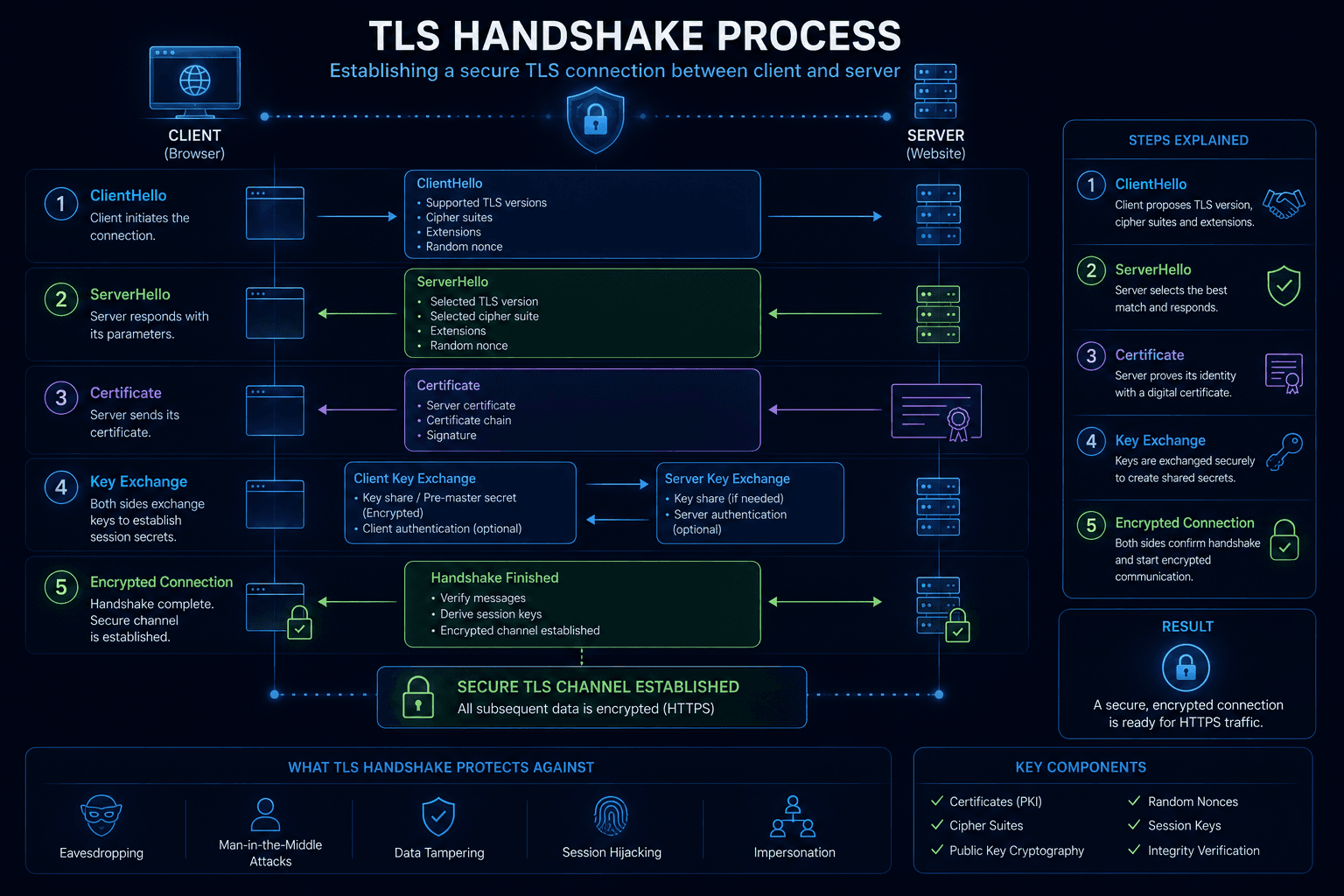
Only after these steps are complete can encrypted HTTP traffic begin.
6. Sending the first HTTP request
With the secure connection established, the browser finally sends its first request.
Along with the requested page, it also transmits information such as:
- HTTP headers;
- cookies;
- User-Agent;
- Accept-Language;
- Client Hints.
The server uses this information to prepare the most appropriate response for your browser.
7. CDN and server processing
Many websites don’t respond directly from their origin server.
Instead, the request often follows a path like this:
Browser ↓ CDN ↓ Load Balancer ↓ Origin Server
A CDN stores cached copies of files closer to visitors, reducing latency.
A load balancer distributes incoming requests across multiple servers, helping maintain both speed and availability.
The origin server then processes the request, retrieves any required database data, generates the HTML page, and sends the response back.
8. Browser Fingerprinting begins
Before the page is fully visible, websites may already start collecting information about the browser.
Common signals include:
- Canvas;
- WebGL;
- Audio;
- ClientRects;
- timezone;
- language.
These signals are frequently combined with network information such as IP Reputation or ASN to evaluate the browser environment.
For more information, see:
9. Rendering the page
Once the browser receives the HTML document, it begins constructing the page.
The rendering pipeline follows roughly this order:
HTML ↓ DOM ↓ CSSOM ↓ Render Tree ↓ Layout ↓ Paint ↓ Composite ↓ Displayed Page
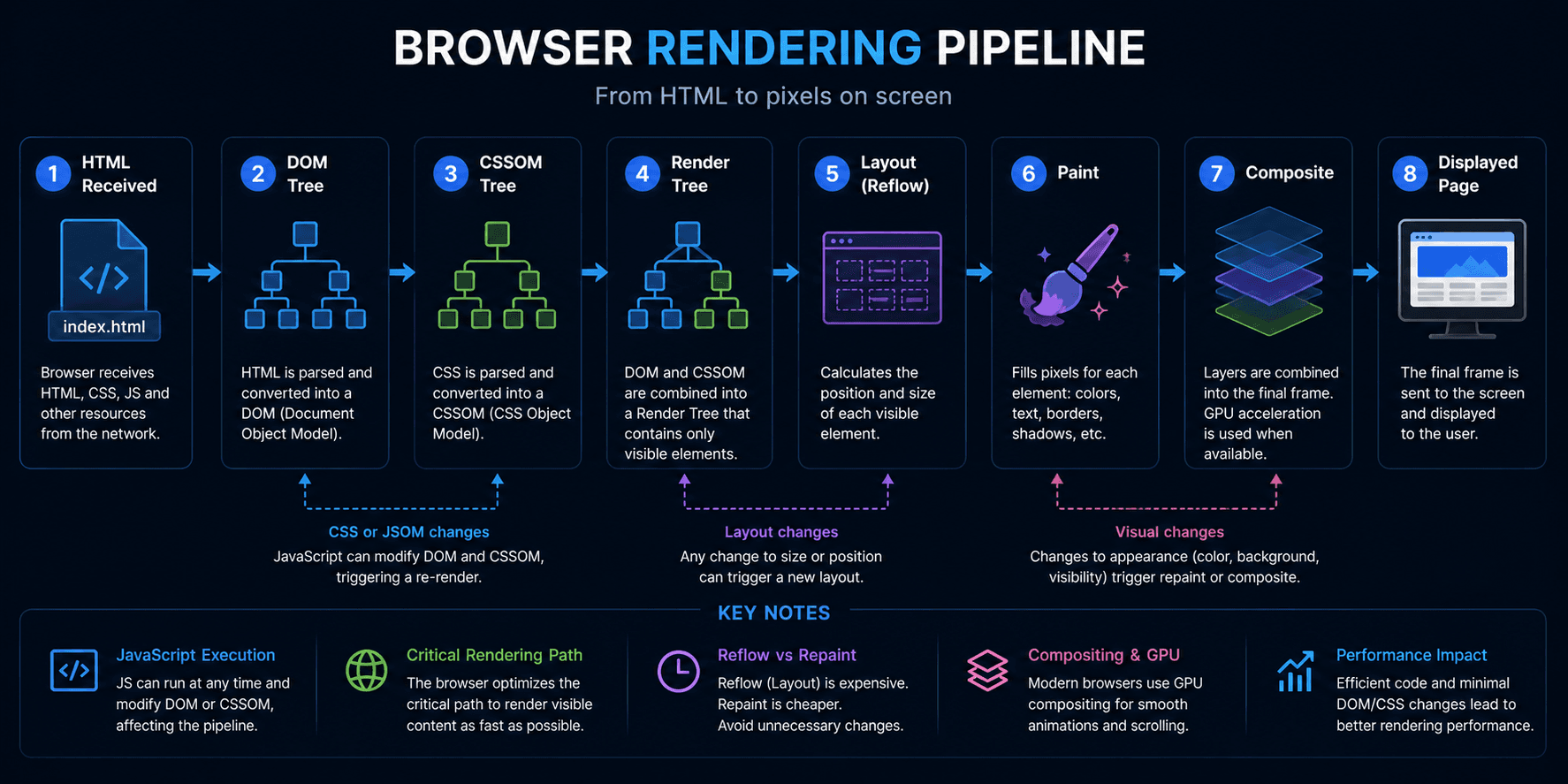
At the same time, the browser downloads additional resources such as CSS files, JavaScript, images, fonts, videos, and API responses.
Most of these requests are performed in parallel, which significantly speeds up loading.
10. Why websites sometimes load slowly
A delay at any stage of this process can make a website feel slow.
Common causes include:
- slow DNS resolution;
- high network latency;
- lengthy TLS negotiation;
- overloaded servers;
- large JavaScript bundles;
- expensive rendering in the browser.
In many cases, the server itself isn’t the problem. The bottleneck may appear much earlier in the loading process.
How does a VPN change the process?
Using a VPN doesn’t change the overall sequence of events.
The only difference is that your traffic first travels through a VPN server before reaching the destination website.
The path becomes:
Browser ↓ VPN Tunnel ↓ VPN Server ↓ Website
DNS lookups, TLS Handshakes, HTTP requests, and rendering all happen exactly as before.
The website simply sees the VPN server’s IP address instead of your own.
For example, WhoX VPN supports protocols such as OpenVPN and IKEv2, creating an encrypted tunnel without changing the website loading process itself.
It’s also worth remembering that a VPN doesn’t automatically make websites load faster. Speed still depends on network quality, server distance, and the VPN infrastructure.
Check what websites actually see
After changing your VPN, proxy, or browser settings, it’s useful to verify how your connection appears from the outside.
With Whoer.net, you can check:
- Public IP address;
- DNS servers;
- WebRTC;
- Browser Fingerprint.
These tests help confirm that your connection is configured exactly as expected.