WebGL Fingerprinting Explained: How Websites Identify Your Graphics Hardware
Learn how WebGL Fingerprinting works and how websites analyze your graphics hardware. Discover the difference between WebGL Image and WebGL Context Info.

Paul Jackson
Technology editor

When Browser Fingerprinting comes up, WebGL is almost always mentioned alongside Canvas, fonts, or ClientRects.
At first glance, it seems simple: a website renders a hidden image, calculates a hash, and uses it as part of your browser fingerprint.
In practice, WebGL Fingerprinting is more sophisticated than that.
It consists of two independent components:
- WebGL Image — the image rendered by your graphics hardware.
- WebGL Context Info — information about the graphics environment returned by the WebGL API.
Modern anti-fraud systems evaluate both at the same time. Looking at only one of them provides an incomplete picture.

What is WebGL Fingerprinting?
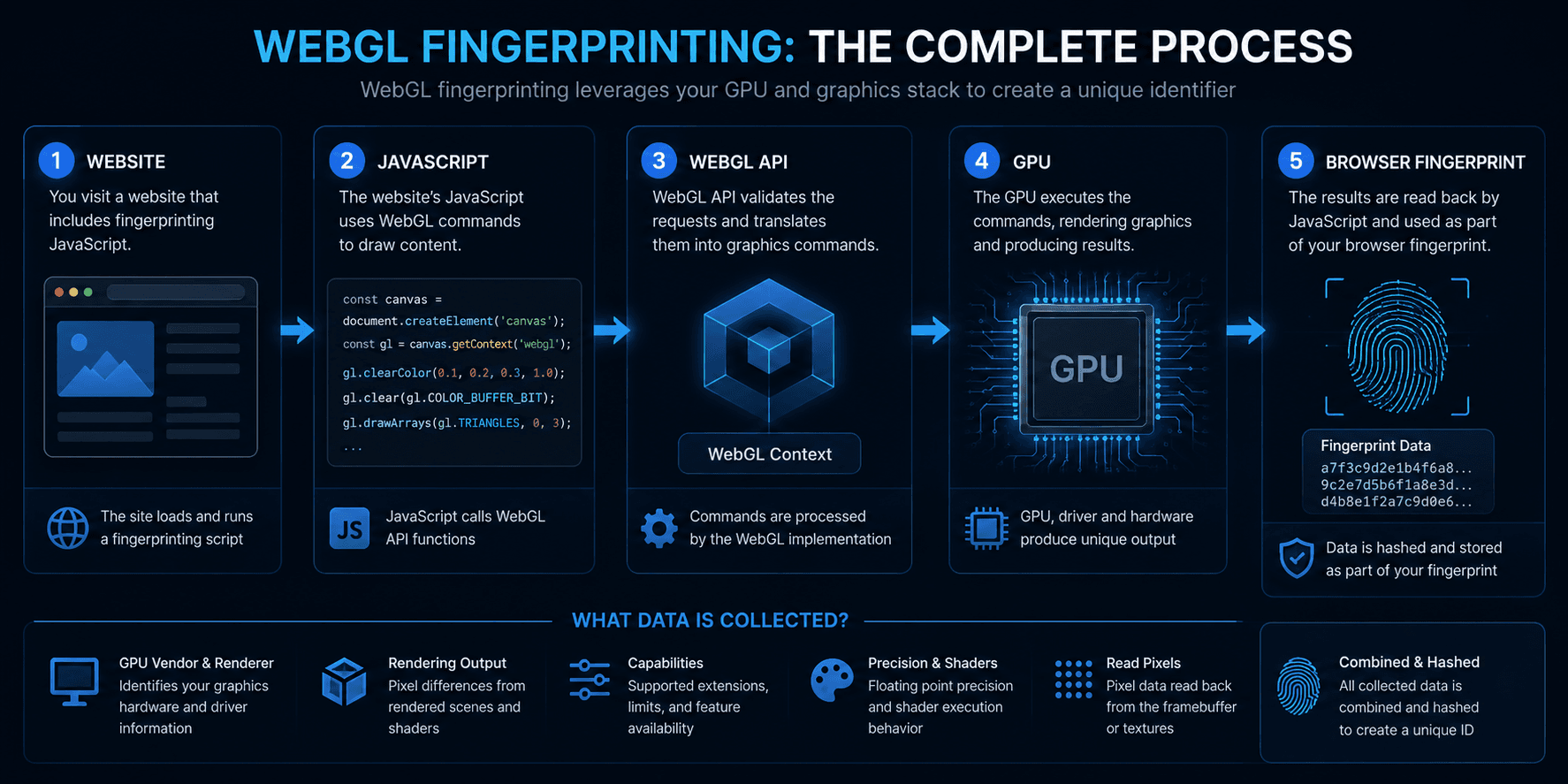
WebGL Fingerprinting uses the browser’s WebGL API to communicate with the graphics subsystem.
The collected information becomes one of many signals that form the Browser Fingerprint.
Unlike Canvas Fingerprinting, WebGL doesn’t rely solely on a rendered image. It can also query the browser for details about the graphics environment itself.
A simplified workflow looks like this:
WebGL Image: the rendered result
The first component is the image produced by the GPU.
The website asks the browser to render an invisible 3D scene. Once rendering is complete, JavaScript reads the resulting pixels and converts them into a hash.
The process looks like this:
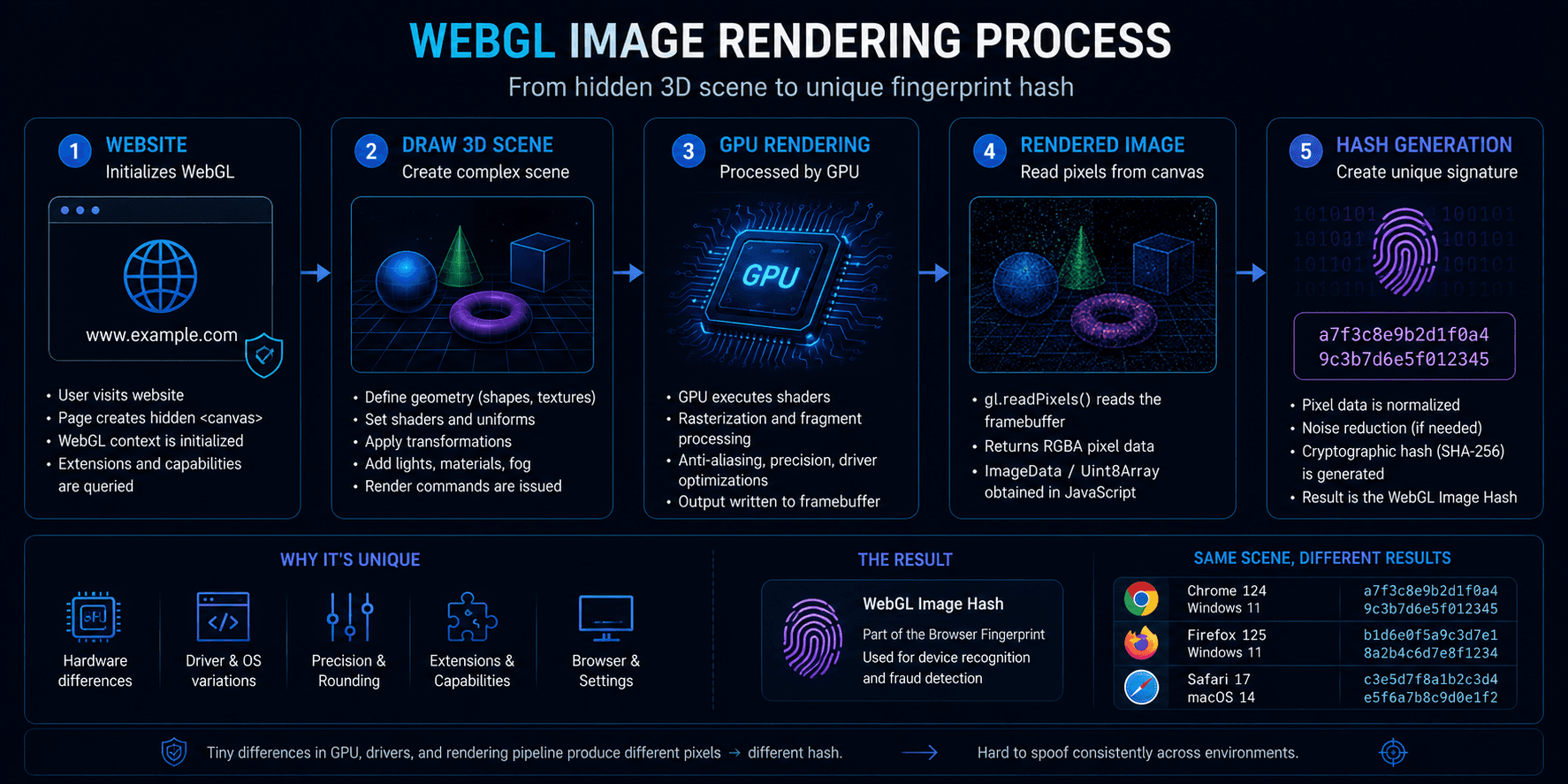
The user never sees this scene because it is rendered in the background during page loading.
What affects the rendered image?
Even if two browsers draw exactly the same 3D object, the final pixels may not be identical.
The result depends on several factors, including:
- GPU model;
- graphics driver;
- operating system;
- browser;
- ANGLE implementation;
- graphics libraries;
- hardware rendering behavior.
Most of these differences are invisible to the human eye, but they are enough to generate different hashes.
Why WebGL Image cannot be completely spoofed
One important detail is often overlooked.
The rendered image is produced by the real GPU installed in the device.
Because of that, perfectly imitating a completely different graphics card is practically impossible.
Modern anti-detect browsers, including WadeX, do not replace the rendering process itself.
Instead, they may apply a small amount of post-processing noise after the GPU finishes rendering. This changes the resulting hash without pretending that one graphics card is physically another.
The same principle is often used for Canvas Fingerprinting.
Adding excessive or unrealistic noise is generally discouraged, since some modern anti-fraud systems can recognize overly aggressive modifications.
WebGL Context Info
The second part of WebGL Fingerprinting has nothing to do with rendered images.
Instead, the website queries the WebGL API for information about the graphics environment.
Typical values include:
- Vendor;
- Renderer;
- WebGL version;
- supported extensions;
- maximum texture size;
- hardware capabilities.
The process is much simpler:
Website ↓ WebGL Context ↓ Graphics Information
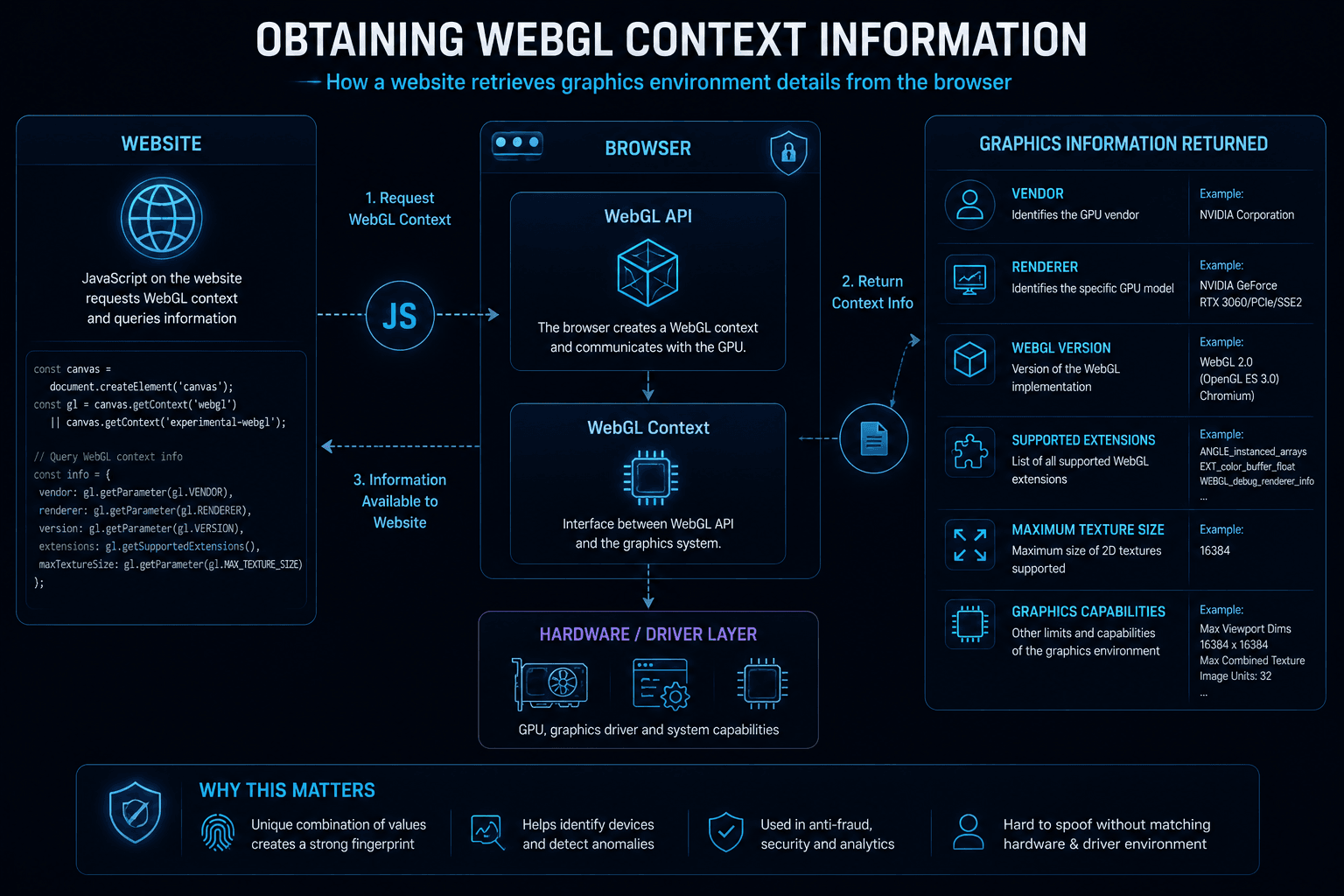
Unlike WebGL Image, these values are simply returned by the browser.
Why Context Info can be modified
Because Context Info consists of browser-reported values rather than physical rendering results, anti-detect browsers can replace them with another internally consistent profile.
There’s no need to recreate the output of another GPU. Only the reported parameters are changed.
As long as those values remain realistic and consistent with the rest of the browser profile, detecting such modifications becomes significantly more difficult.
Why Image and Context must stay consistent
Modern anti-fraud systems rarely evaluate WebGL Image and Context separately.
Instead, they compare both components.
Imagine a browser reports:
WebGL Context
↓
NVIDIA RTX 4090
while the rendered image behaves much more like:
Intel UHD Graphics
↓
The inconsistency immediately stands out.
This is why changing isolated values rarely improves a fingerprint.
A coherent graphics profile is far more important than modifying as many parameters as possible.
WebGPU and WebGL
Another technology becoming increasingly relevant is WebGPU.
Like WebGL Context, it exposes information about the graphics environment rather than analyzing rendered pixels.
If a website collects data from both APIs, the reported hardware should match.
For example, if WebGL identifies one GPU while WebGPU reports completely different capabilities, the browser profile may appear inconsistent.
WebGL as part of Browser Fingerprinting
WebGL is only one element of a much larger identification system.
Modern websites often evaluate it together
The goal isn’t to identify users through WebGL alone.
Instead, anti-fraud systems evaluate whether all browser and network characteristics form a believable environment.
How WadeX manages WebGL
WadeX handles the two WebGL components differently.
For WebGL Image, the browser preserves rendering by the real GPU and, when appropriate, applies only minimal post-processing to the final image rather than replacing the rendering itself.
For WebGL Context Info, WadeX can substitute browser-reported parameters with another internally consistent graphics profile.
At the same time, WebGPU is automatically synchronized with the selected WebGL Context so that both APIs describe the same graphics environment.
The recommended approach is to start with Smart Mode.
Instead of trying to imitate completely different hardware, Smart Mode selects a graphics profile that remains close to the device’s natural rendering behavior.
The result is a browser profile that appears much more realistic than one built from unrelated or contradictory graphics parameters.
Conclusion
WebGL Fingerprinting is more than a single rendered image.
Modern websites analyze both:
- the image generated by the real GPU;
- the graphics information returned through the WebGL API.
Those signals are then combined with many other browser characteristics to evaluate whether the entire environment looks internally consistent.
Today, maintaining realistic relationships between fingerprint components is far more important than modifying individual values in isolation.