Why Does CAPTCHA Keep Appearing and How to Fix It?
Why websites keep showing CAPTCHA: IP reputation, VPN usage, Browser Fingerprinting, Cookies, and browser settings. Common causes of repeated CAPTCHA challenges and how to fix them.

Paul Jackson
Technology editor
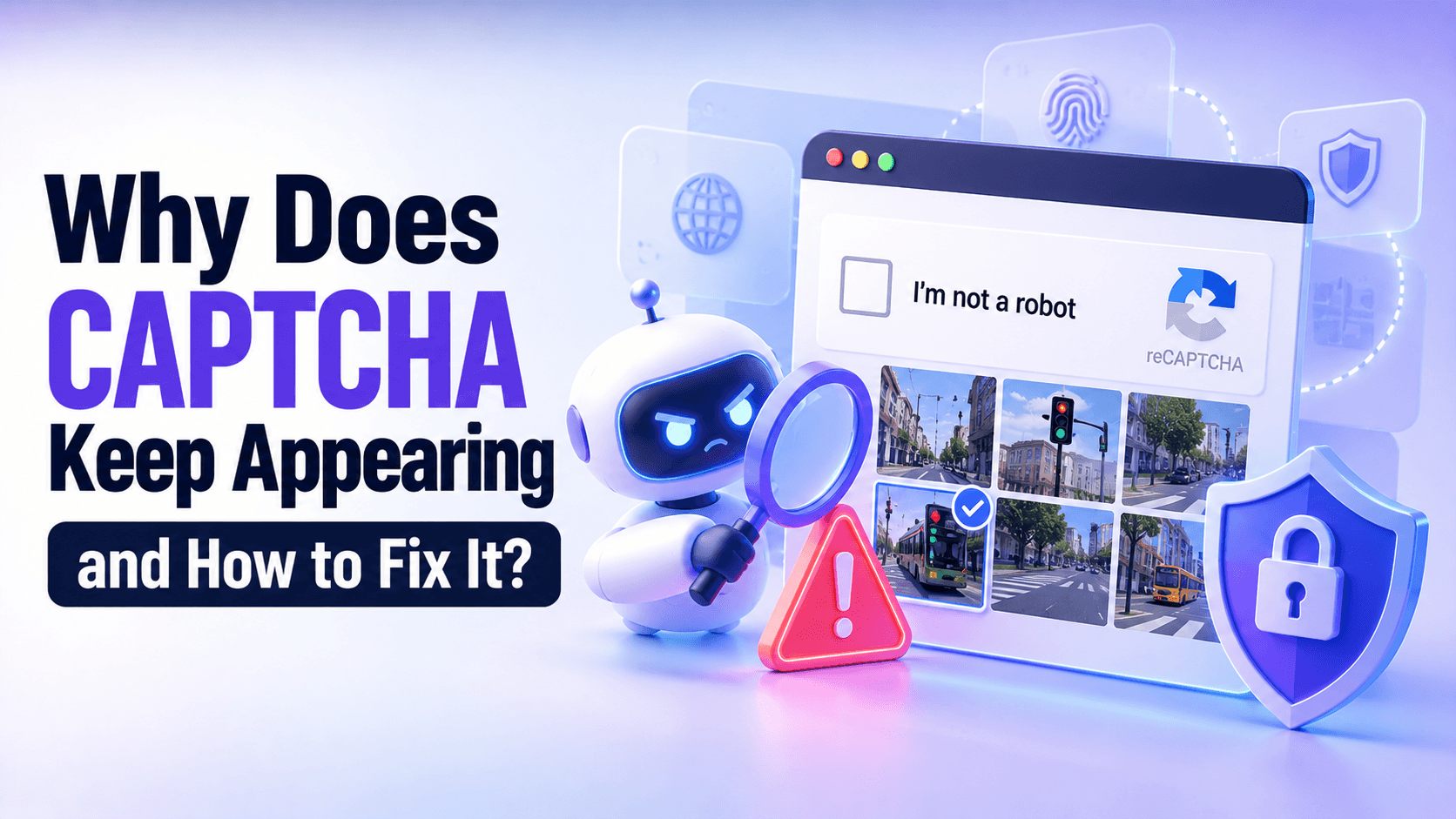
You open a website, but instead of the page you want, you’re greeted with another CAPTCHA. You select the right images, prove you’re not a robot, move on — and immediately face another verification challenge.
VPN users often encounter these checks more frequently. Hundreds of people may share the same VPN exit IP, while their browsers retain their original settings and browsing data.
If the problem involves more than just your VPN connection, you can try NOID, a browser that offers separate identities with their own settings and connections. A 7-day free trial is available. It won’t guarantee that CAPTCHA challenges disappear, but it gives you a different approach to test.
Why Do Websites Think You’re a Bot?
Imagine entering a building with an access control system. Most visitors walk straight in, but occasionally, security asks someone to show their ID. Even people who haven’t done anything wrong may be asked to verify their identity.
Website security systems work in a similar way. They evaluate incoming connections and sometimes request additional verification to confirm that a visitor is legitimate.
Several signals may influence this decision:
- IP Reputation — the history and reputation of your IP address.
- Request Patterns — how frequently requests are made and what they look like.
- Cookies and JavaScript — whether your browser can complete verification and save the result.
- Browser Fingerprint — characteristics of your browser and device.
- Security Rules — restrictions configured by the website owner, including rate limits.
Not all verification challenges look the same. Traditional CAPTCHA asks you to solve a puzzle, while reCAPTCHA and hCaptcha may evaluate additional signals. Cloudflare Managed Challenge can sometimes verify your browser without displaying a visual puzzle.
That’s why a Checking your browser page isn’t necessarily a traditional CAPTCHA.
You can learn more about these mechanisms in the Cloudflare documentation.
Why Does CAPTCHA Keep Appearing?
Your IP Address Has a Poor Reputation
Websites may consider the history of requests associated with a particular IP address. If that address was previously used for spam or automated traffic, the next person using it may face additional verification.
For example, your internet provider might assign you an IP address that someone else used before you.
You’re Using a VPN or Proxy
A VPN routes your traffic through a server whose public IP address may be shared by many users.
Imagine 300 people connected to the same VPN server. Some are watching videos, others are searching the web, and a few are constantly refreshing pages.
From a website’s perspective, requests from these users appear to come from the same IP address. If the combined activity looks unusual or exceeds established rate limits, the security system may trigger a CAPTCHA.
However, not every VPN IP has a poor reputation. The outcome depends on the specific server and the website’s security rules.
It’s also important to understand that a VPN changes your public IP address, but it doesn’t change your existing browser environment. Your cookies, login sessions, browser settings, and Browser Fingerprint generally remain the same.
For example, after connecting to a VPN server in the United States, a website will see a US IP address. However, your browser will still use its original language, time zone, and saved cookies.
Changing VPN servers may help if CAPTCHA challenges are related to IP reputation. But if they’re caused by browser settings, cookie issues, or other signals, changing your IP alone may not be enough.
Your Browser Can’t Complete Verification
Sometimes you solve a CAPTCHA correctly, but your browser fails to save the result.
This can happen because of blocked cookies, disabled JavaScript, an outdated browser, or conflicts with privacy and security extensions.
Your Connection Signals Look Unusual
Websites may consider your IP location, browser language, time zone, and other characteristics.
For example, your VPN might provide a US IP address while your browser language is set to Russian and your device uses Japan’s time zone.
This combination is perfectly possible for a regular user. However, some security systems may consider such inconsistencies when evaluating a connection.
The Website Has Strict Security Rules
Sometimes the problem has nothing to do with you.
A website owner may have tightened security after an attack or introduced strict rate limits, which restrict how many requests can be made within a certain period.
As a result, even legitimate visitors may encounter repeated CAPTCHA challenges.
Why Does CAPTCHA Keep Coming Back After You Solve It?
Successfully selecting the right images doesn’t always mean the entire verification process has been completed.
The website still needs to process the result and, in some cases, save proof of verification in your browser. For example, Cloudflare may use a cookie called cf_clearance.
If cookies are blocked, JavaScript encounters errors, or your connection drops, the verification process may start again. Another page may also apply its own security rules.
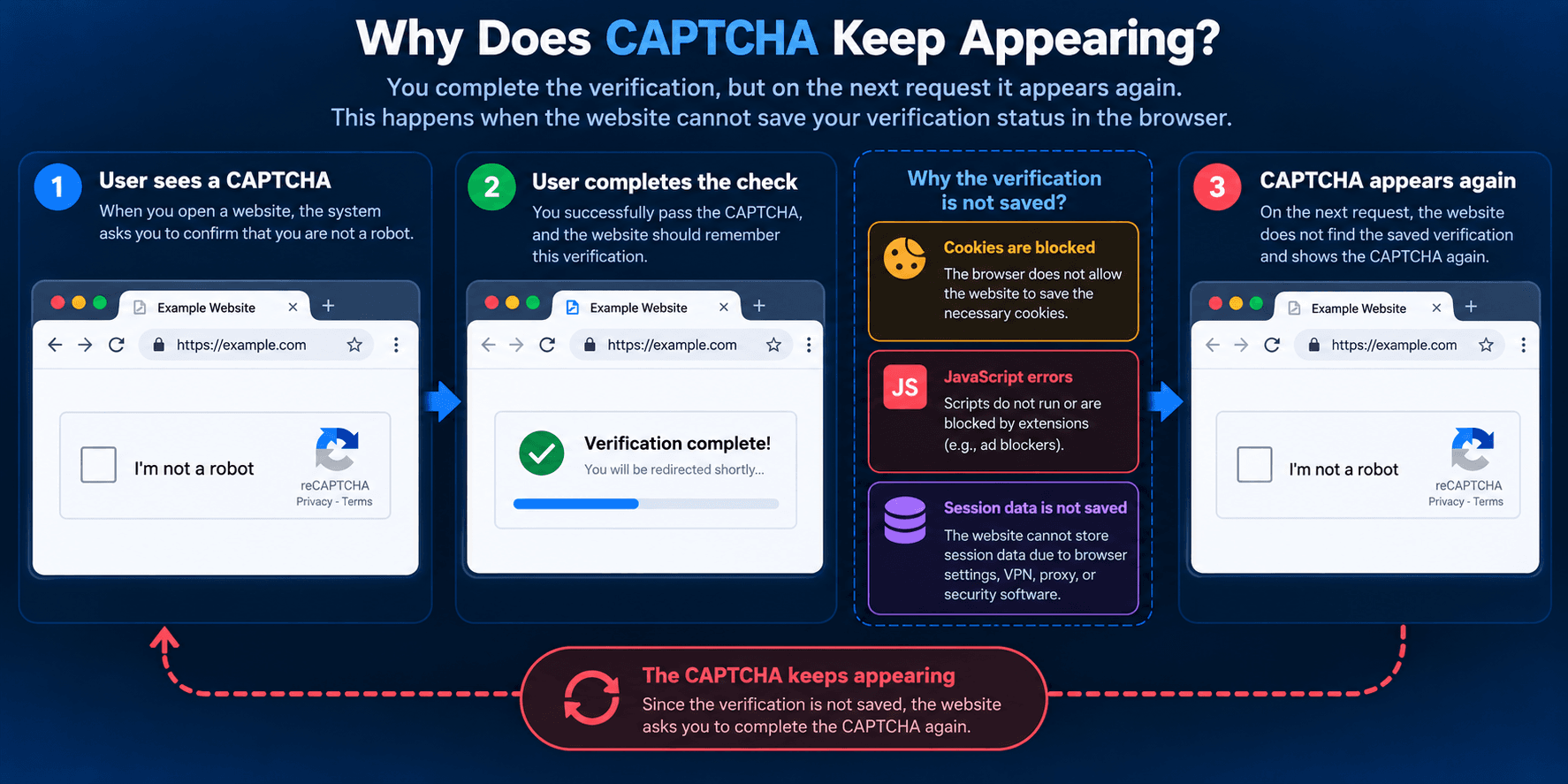
Cloudflare explains additional causes of recurring verification challenges in its troubleshooting guide.
For a closer look at Cloudflare verification and access restrictions, read our separate VPNHook article.
How Can You Identify the Problem?
Start by comparing when and where CAPTCHA challenges appear:
| What Happens | Possible Explanation |
|---|---|
| CAPTCHA appears only when using a VPN | VPN exit IP reputation |
| Verification starts after changing your IP | Changes in network conditions |
| CAPTCHA returns after you solve it | Cookies, JavaScript, or session data |
| CAPTCHA doesn’t load | Browser extensions or blocked scripts |
| The problem occurs on only one website | Strict security rules on that website |
| CAPTCHA appears across multiple websites | Possible network or browser issues |
These are clues to help you investigate, not definitive diagnoses.
How to Stop Repeated CAPTCHA Challenges
Check Your IP Address with Whoer.net
Use Whoer.net to see which IP address and country websites can detect. A successful connection check doesn’t guarantee CAPTCHA-free browsing.

Try a Different VPN Server
If CAPTCHA appears only when using a specific VPN server, its exit IP address may be contributing to the problem.
Update Your Browser
Outdated browser versions may have trouble completing modern CAPTCHA challenges and other verification checks.
Check Cookies and JavaScript Settings
Make sure Cookies and JavaScript are enabled for the affected website. They may be necessary to complete verification and remember the result.
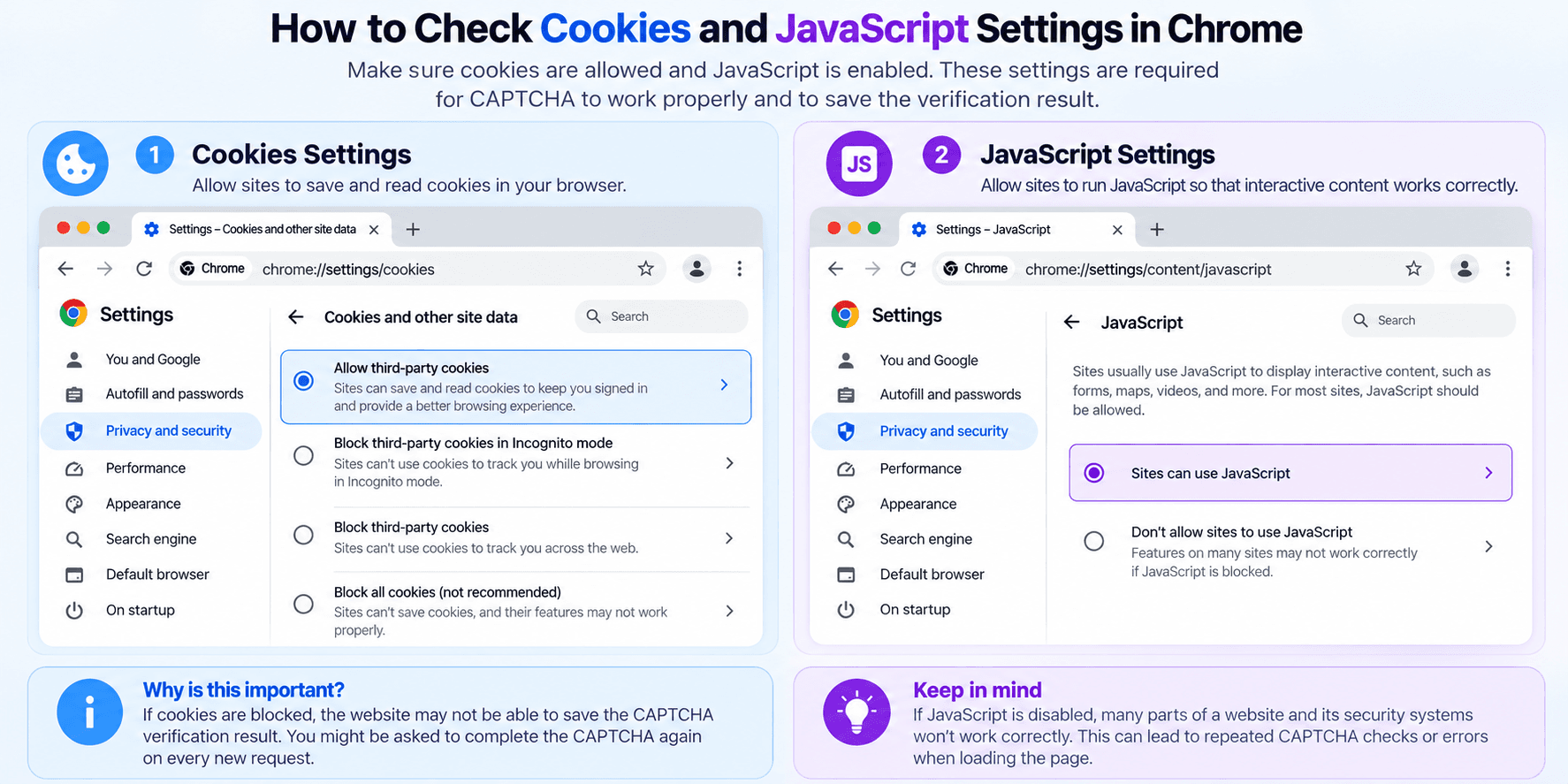
Check Your Browser Extensions
Temporarily disable script blockers or other privacy extensions for the affected website to see whether they interfere with CAPTCHA verification.
Avoid Refreshing the Page Repeatedly
Repeated requests may trigger rate limits and additional security restrictions, potentially leading to more CAPTCHA challenges.
Scan Your Device for Unwanted Software
Check your device for malware or unwanted software, especially if you receive warnings about automated traffic you didn’t generate. Google explains possible causes in its unusual traffic help article.
If nothing works, contact the website’s support team.
And don’t treat Incognito Mode as a universal fix. Because it doesn’t retain browsing data between private sessions, it can sometimes lead to additional verification challenges.
NOID: When You Need a Separate Browser Environment
If changing VPN servers and checking your browser settings hasn’t helped, you can try a separate browser environment.
NOID lets you create independent Browser Identities. Each identity has its own browser and device settings, cookies, browsing history, login data, and connection, including access to built-in residential proxies.
You don’t need to manually configure a complex Browser Fingerprint.
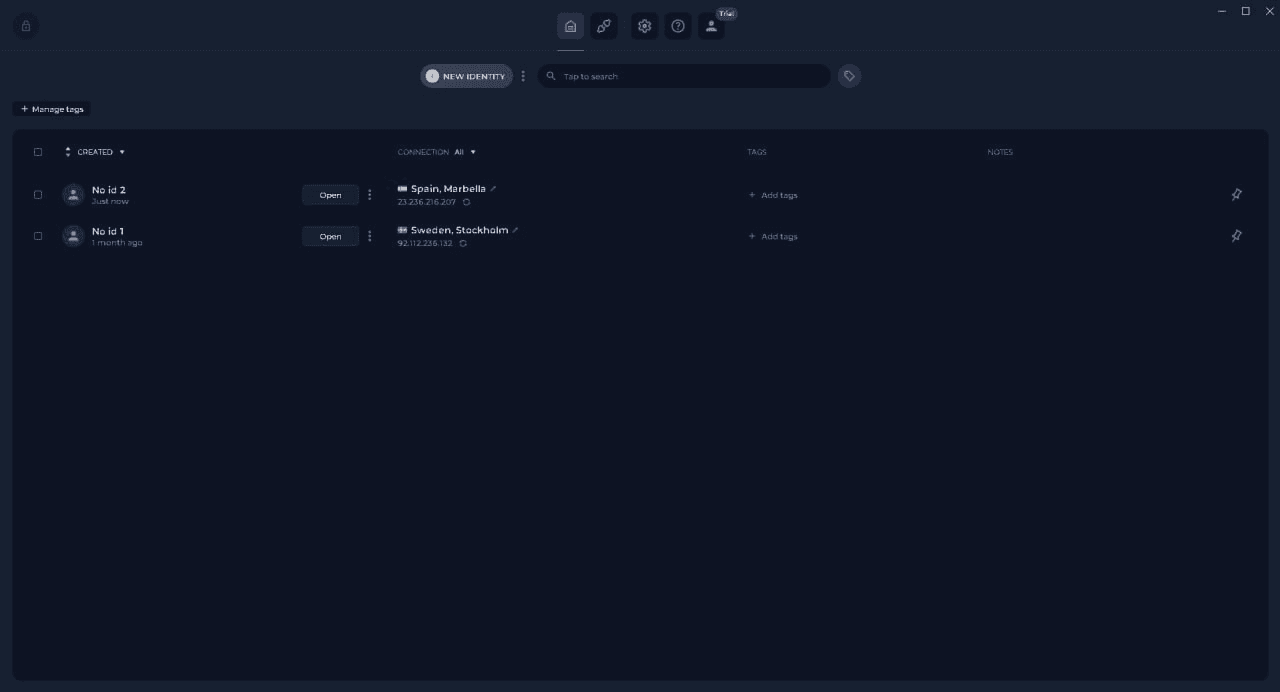
However, using a separate environment lets you check whether your usual browser context is contributing to the problem.
Try NOID Free for 7 Days — No Credit Card Required
What Does CAPTCHA Actually Tell You?
A CAPTCHA challenge isn’t proof that you’re a bot.
Automated security systems can make mistakes, and different websites use different criteria to decide when additional verification is necessary.
Instead of solving the same CAPTCHA over and over, it’s better to systematically check your IP address, connection, cookies, and browser settings.
Sometimes the problem takes a minute to fix. Other times, a separate browser environment may be worth trying. The important thing is to identify the cause rather than randomly changing settings.