How Websites Track Users: Cookies, Metadata, Pixels, and Fingerprinting
Modern websites combine Cookies, Browser Fingerprinting, Metadata, Tracking Pixels, network information, and other signals to analyze behavior and recognize returning browsers.

Paul Jackson
Technology editor
Every time you open a website, your browser and the web server begin exchanging data.
Within the first few seconds, the website can see your public IP address, detect browser language, set Cookies, load analytics scripts, and receive technical information about your browser, device, and connection.
Modern websites rarely rely on a single tracking mechanism. Instead, several technologies often operate simultaneously, with each collecting a different part of the overall picture.
Together, these signals help websites analyze visitor behavior, measure performance, personalize content, detect suspicious activity, and sometimes recognize the same browser during future visits.
In this article, we will look at the main technologies used for online tracking, what information they collect, and how separate technical signals can contribute to a broader digital profile.
What Happens When You Open a Website?
Loading a web page involves much more than simply downloading an HTML document.
As soon as you open a website, several processes can begin almost simultaneously.
Depending on the website, your browser may:
- perform DNS resolution;
- establish a connection to the destination server or CDN;
- send an HTTP request;
- receive HTML, CSS, and JavaScript;
- load third-party resources;
- read or set Cookies;
- execute analytics scripts;
- request images, fonts, and Tracking Pixels;
- expose browser and device characteristics through web APIs.
Each process reveals only a limited amount of information.
Combined, however, these signals can help a website understand how a visitor arrived, how they interact with the page, and whether the browser has been seen before.
What Information Can a Website See Automatically?
Even before you click a button, fill out a form, or sign in to an account, a website can receive certain technical information.
Depending on the browser, connection, permissions, and scripts used by the site, this may include:
- public IP address;
- approximate IP-based location;
- browser language;
- timezone;
- operating system information;
- browser characteristics;
- screen resolution;
- device type.
Much of this information has legitimate technical purposes.
Browser language can be used to select localization. Screen dimensions help websites adapt their interfaces to different devices. IP addresses are required for network communication and may also be used for security or regional content delivery.
At the same time, these parameters can become part of a broader set of signals used for analytics and identification.
| Parameter | Main Technical Purpose |
|---|---|
| Public IP | Network communication, security, and regional content delivery |
| Approximate Location | Regional content delivery based on IP information |
| Browser Language | Localization |
| Timezone | Regional and time-related website behavior |
| OS | Technical compatibility and device environment information |
| Browser Characteristics | Technical compatibility and browser environment information |
| Screen Resolution | Adapting interfaces to different screens and devices |
| Device Type | Adapting website behavior and interfaces to the device |
Cookies
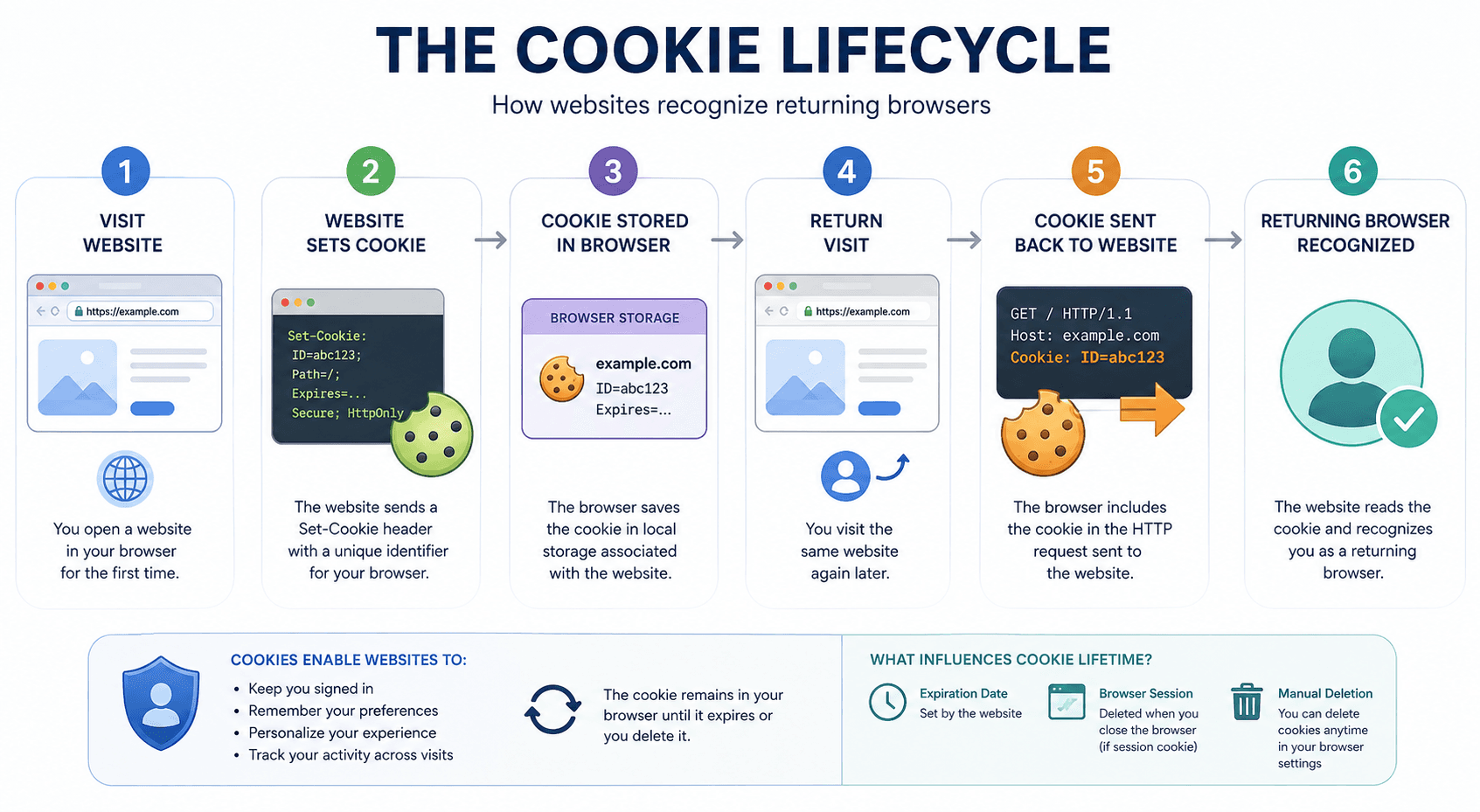
One of the most familiar browser technologies is Cookies.
Cookies are small pieces of data that a website can store in the browser and receive again with later requests under applicable browser rules.
Cookies themselves are simply a storage mechanism. What matters is how websites use them.
For example, Cookies can help:
- keep users signed in;
- remember interface language;
- preserve shopping cart contents;
- store preferences;
- recognize returning browsers;
- support analytics and attribution systems.
Without Cookies or equivalent browser storage mechanisms, many common website features would be less convenient or would require users to re-establish their state repeatedly.
Cookies can also be used for tracking, particularly when identifiers are associated with analytics or advertising systems.
Browser Fingerprinting
Cookies are not the only way to distinguish one browser environment from another.
Users can delete Cookies, block some types of storage, use Private or Incognito Mode, or switch browser profiles.
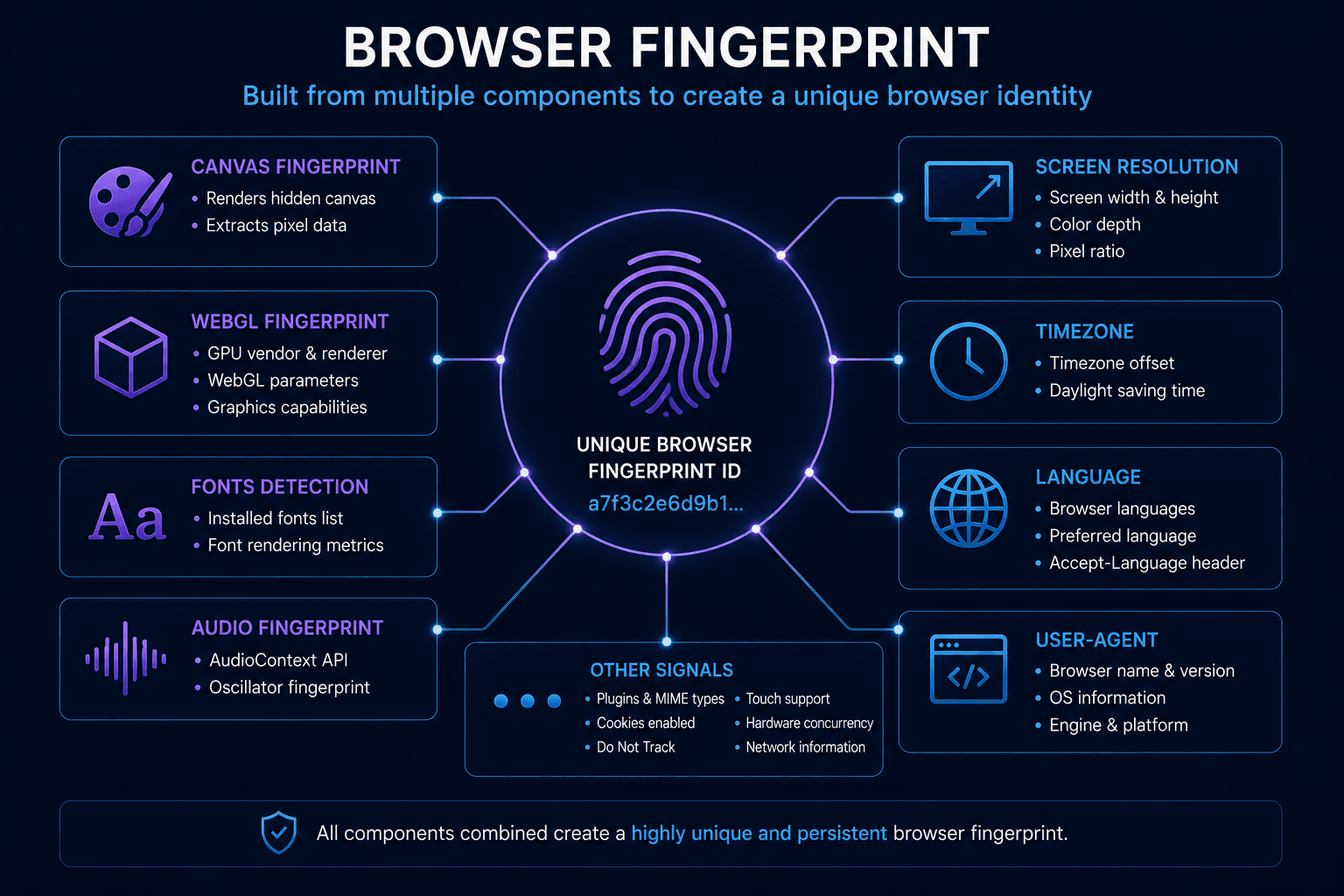
Websites can therefore also analyze technical characteristics of the browser itself. This approach is known as Browser Fingerprinting.
A fingerprint may incorporate signals related to:
- Canvas;
- WebGL;
- WebGPU;
- installed or available fonts;
- Audio;
- ClientRects;
- screen characteristics;
- browser and operating system parameters;
- other browser APIs and rendering behavior.
No single parameter necessarily identifies a specific person.
Instead, multiple signals can be combined into a technical profile that helps distinguish one browser environment from another.
The effectiveness of Browser Fingerprinting depends on the number and stability of available signals. A fingerprint should therefore not be treated as a guaranteed unique identifier, but it can provide an additional recognition signal alongside Cookies, accounts, IP information, and other data.
What Is Metadata?
Not every piece of information collected by a website describes the actual content of a user’s activity.
Another important category is Metadata.
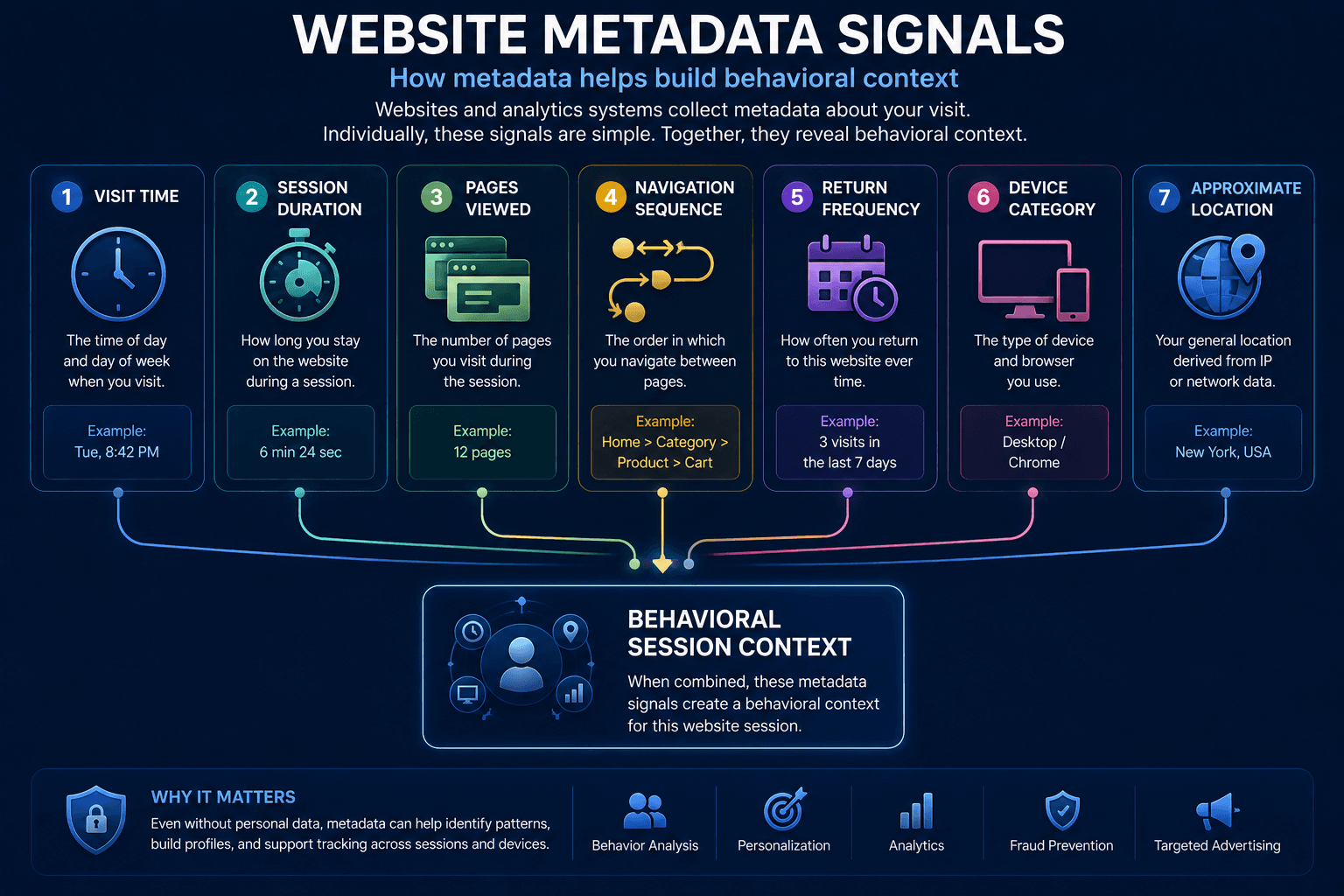
Metadata describes characteristics surrounding an interaction rather than necessarily containing its substantive content.
For example, analytics systems may record:
- time of visit;
- session duration;
- pages viewed;
- sequence of navigation;
- frequency of returning visits;
- device category;
- approximate location.
Individually, these details may appear relatively harmless.
Together, they can reveal patterns about when, how often, and how a visitor interacts with a service.
Metadata is therefore an important component of modern web analytics.
What Are Tracking Pixels?
Another widely used tracking mechanism is the Tracking Pixel.
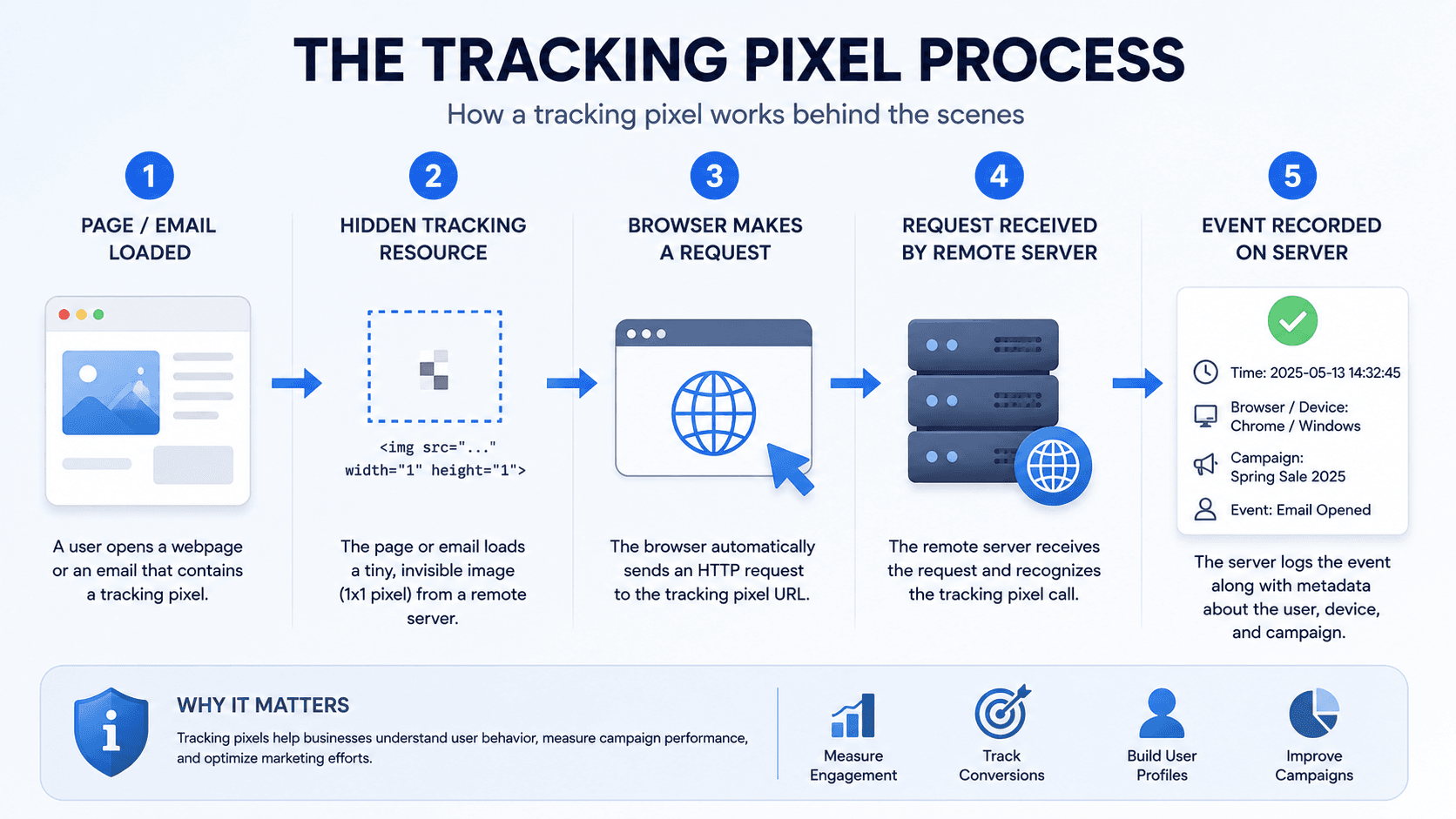
Traditionally, a Tracking Pixel can be a tiny transparent image—often described as a 1×1 pixel resource—loaded from a remote server.
When the browser requests that resource, the server can record the request.
This can help determine:
- whether a page or message was loaded;
- when the request occurred;
- which browser or device characteristics accompanied the request;
- which campaign or source was associated with the visit.
Tracking Pixels are commonly used by:
- analytics platforms;
- advertising systems;
- marketing platforms;
- email services.
Modern tracking implementations are not necessarily limited to literal 1×1 images. Similar measurement can also be implemented through scripts and other network requests.
Referrer and UTM Parameters
Websites often need to know not only that a visitor arrived, but also where the visit came from.
One signal used for this purpose is the Referrer.
When a user follows a link from one page to another, the browser may provide information about the referring page, subject to browser behavior, Referrer Policy, and other privacy restrictions.
Marketing systems also commonly use UTM parameters.
For example:example.com/?utm_source=google&utm_medium=cpc&utm_campaign=summer_sale
Parameters such as these can identify:
- traffic source;
- marketing channel;
- advertising campaign;
- specific promotion.
UTM parameters do not inherently identify a person. Their primary purpose is campaign attribution: helping website owners understand which marketing activities generated visits or conversions.
| Parameter | Referrer | UTM Parameters |
|---|---|---|
| Data source | Information about the referring page provided by the browser | Parameters included in the destination URL |
| What it shows | Where the visit came from | Traffic source, marketing channel, advertising campaign, or specific promotion |
| Typical purpose | Understanding the referring page or traffic source | Campaign attribution and measuring marketing activities |
| Main limitations | Depends on browser behavior, Referrer Policy, and other privacy restrictions | Does not inherently identify a person and depends on parameters being included in the URL |
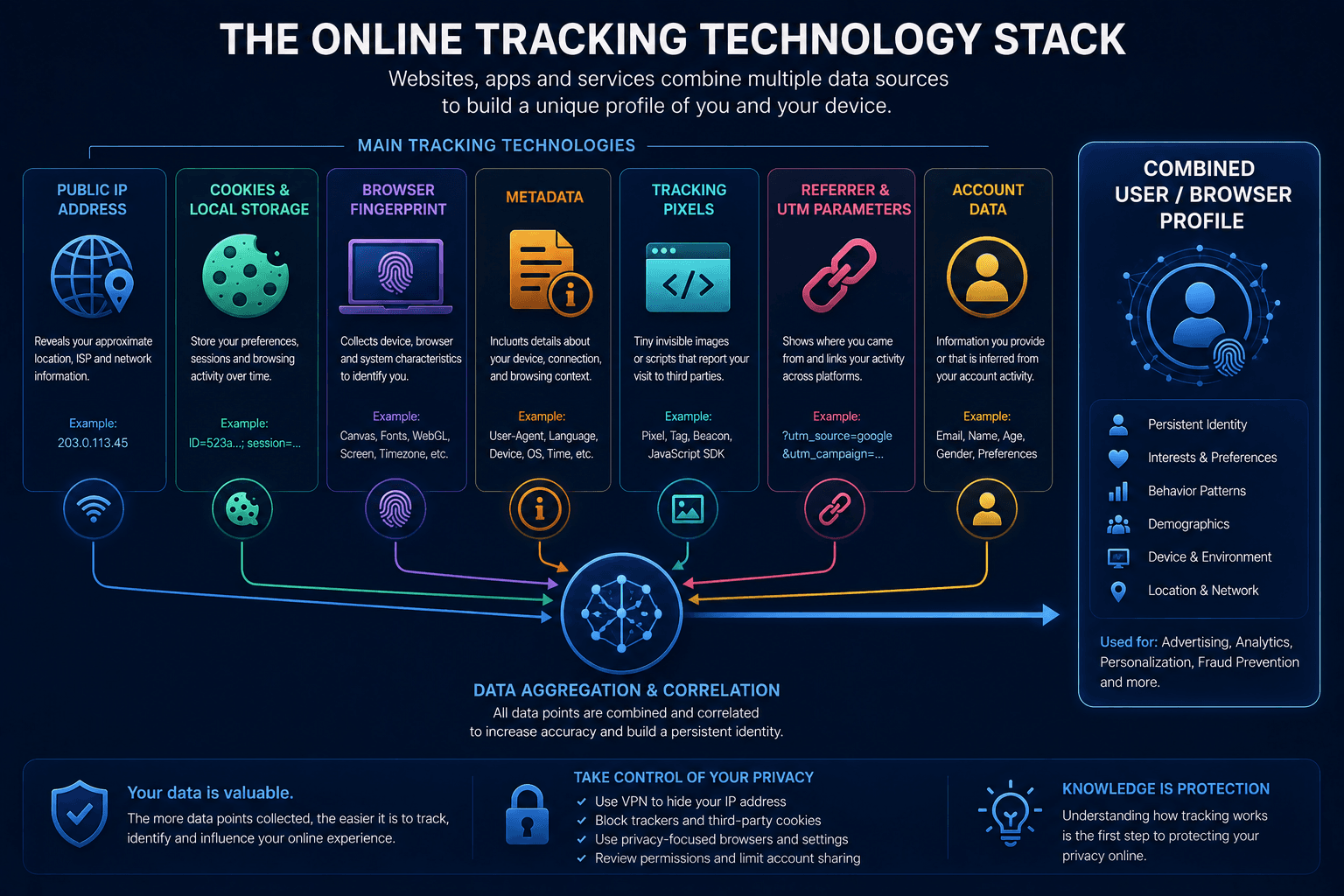
How Do These Tracking Technologies Work Together?
Most modern websites do not depend on a single tracking mechanism.
Multiple sources of information can be analyzed together.
For example:
- IP address provides network information;
- Cookies can maintain identifiers and recognize returning sessions;
- Browser Fingerprinting analyzes characteristics of the browser environment;
- Metadata describes patterns of interaction;
- Tracking Pixels can record page views and campaign events;
- Referrer and UTM parameters help identify traffic sources.
Each technology contributes a different piece of information.
Combined with accounts, analytics identifiers, and historical activity, these signals can create a more detailed picture of a browser or session than any single mechanism could provide.
This is why deleting Cookies alone does not necessarily eliminate every form of online tracking.
Can Websites Recognize Returning Visitors?
In some cases, yes.
The simplest method is a persistent identifier stored in Cookies or another form of browser storage.
If that identifier remains available, the website or analytics provider may recognize the browser when it returns.
Other signals can provide additional context, including:
- account login;
- Browser Fingerprint;
- IP and network characteristics;
- Local Storage;
- previous analytics identifiers;
- behavioral patterns.
However, recognition is not always certain.
Browsers increasingly restrict cross-site tracking, storage access, and third-party Cookies. Technical parameters can also change over time.
For this reason, modern tracking systems generally work best by combining several signals rather than relying on one permanent identifier.
What Is Browser Warm Up?
A browser that has been used regularly for some time naturally accumulates local state.
Depending on browsing activity, this can include:
- Cookies;
- Browser Cache;
- Local Storage;
- browsing history;
- saved site preferences;
- authentication state.
A completely new browser profile, by comparison, begins with little or none of this local history.
This difference is sometimes relevant when working with isolated browser profiles.
The Browser Warm Up feature in WadeX is intended to create browsing activity within a profile so that local browser state can accumulate before the profile is used for its primary workflow.
This can include visiting websites and interacting with web content in a way that generates ordinary browser data such as Cookies and Cache.
However, Browser Warm Up should not be treated as a guaranteed method for bypassing anti-fraud systems.
Modern platforms can evaluate many other signals, including IP Reputation, Browser Fingerprint consistency, account history, and user behavior. Local browser history is only one part of that environment.
| Parameter | New Browser Profile | Warmed-Up Browser Profile |
|---|---|---|
| Cookies | Minimal or none | Accumulated Cookies |
| Browser Cache | Minimal or none | Accumulated Cache |
| Local Storage | Minimal or none | Accumulated Local Storage |
| Browsing History | Minimal or none | Accumulated Browsing History |
| Site Preferences | Minimal or none | Accumulated Site Preferences |
What Does a VPN Change?
A VPN affects the network layer of the connection.
When connected to a VPN server, supported internet traffic is routed through an encrypted tunnel between the device and that server.
A VPN service such as WhoVPN can therefore change or protect network-level information by:
- replacing the original public IP with the VPN server’s IP;
- changing the apparent IP-based location;
- routing DNS according to the VPN configuration;
- encrypting traffic between the device and VPN server.
However, a VPN does not automatically disable browser tracking technologies.
Websites may still use:
- Cookies;
- Browser Fingerprinting;
- Tracking Pixels;
- Metadata;
- Local Storage;
- analytics scripts;
- account identifiers.
In other words, VPN and browser privacy tools operate at different layers.
A VPN protects and changes aspects of the network connection. Browser-level privacy controls determine what information websites can store or obtain from the browser environment.
Using a VPN therefore does not make a browser anonymous or prevent websites from recognizing a signed-in account.
| Network Layer | Browser Layer |
|---|---|
| Public IP | Cookies |
| IP Location | Local Storage |
| DNS | Browser Fingerprint |
| Encrypted VPN Tunnel | Tracking Pixels |
| VPN affects this layer | Account Identifiers |
| Network connection information | Browser environment and stored identifiers |
Network Tracking vs Browser Tracking
Understanding this distinction makes online privacy much easier to evaluate.
| Signal | What It Reveals | Can a VPN Change It? |
|---|---|---|
| Public IP | Network endpoint | Yes |
| IP geolocation | Approximate network location | Usually |
| DNS | Domain resolution path | Depends on VPN configuration |
| Cookies | Stored browser identifiers | No |
| Local Storage | Browser-side stored data | No |
| Browser Fingerprint | Browser/device characteristics | No |
| Tracking Pixels | Page or campaign events | No |
| Account login | Account identity | No |
This is why changing an IP address solves only one part of the tracking problem.
The browser, account, and local storage can continue providing separate identification signals.
Conclusion
Modern online tracking rarely depends on a single technology.
Websites and analytics platforms can combine network information, Cookies, Browser Fingerprinting, Metadata, Tracking Pixels, Referrer data, UTM parameters, and other signals.
Each mechanism reveals only part of the picture.
Together, however, they can help websites recognize returning browsers, measure user behavior, personalize content, attribute advertising campaigns, detect suspicious activity, and understand how visitors interact with a service.
Understanding these layers is essential when evaluating online privacy tools.
A VPN can protect the network connection and replace the visible public IP, but it does not remove Cookies or disable Browser Fingerprinting. Browser privacy controls can limit other signals, but they do not replace network-level protection.
Online privacy is therefore best understood as a combination of layers rather than a single setting or technology.