What Is a Domain IP Address and How Do You Find It?
A domain can resolve to different IP addresses depending on DNS, CDN, and location. Learn how to check A and AAAA records and distinguish a site’s IP from your own public address.

Paul Jackson
Technology editor
A domain name makes the web easy to use. You type a website address into your browser, press Enter, and the page opens.
Behind that simple action is a more complex network process.
A domain is a human-readable name. Internet traffic is actually routed using IP addresses, DNS records, CDN infrastructure, Reverse Proxies, and other network layers.
Understanding the relationship between a domain and its IP address can help explain why:
- a website does not open;
- content changes depending on your location;
- the same domain returns different IP addresses;
- Cloudflare displays an additional security check;
- a website behaves differently after you connect to a VPN;
- security or anti-fraud systems treat a connection differently.
A website does not operate in isolation from the surrounding network environment. DNS resolution, the destination IP, CDN routing, and the source of the connection can all affect how a request is handled.
What Is a Domain IP Address?
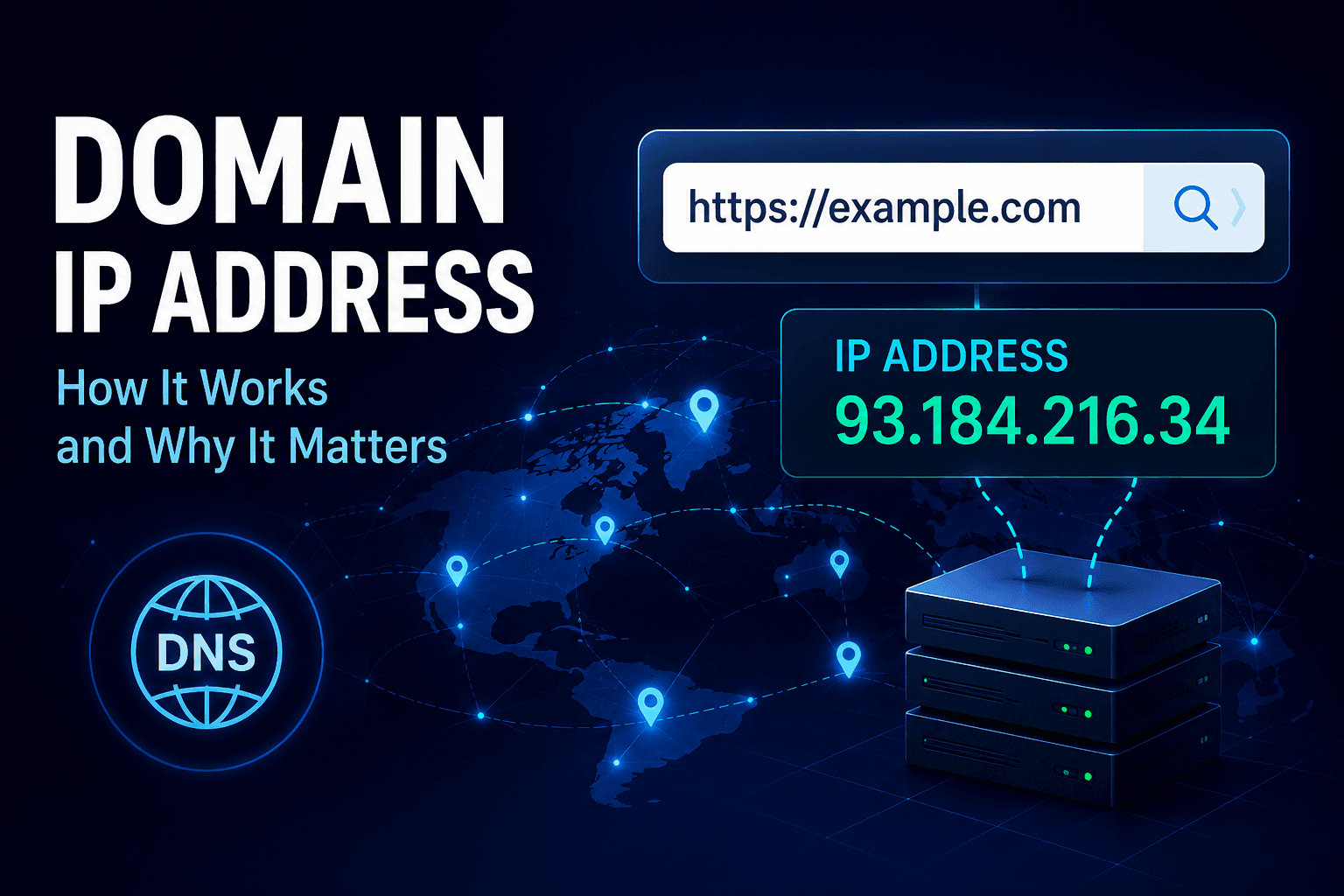
A Domain IP Address is an IP address returned by DNS when a domain name is resolved.
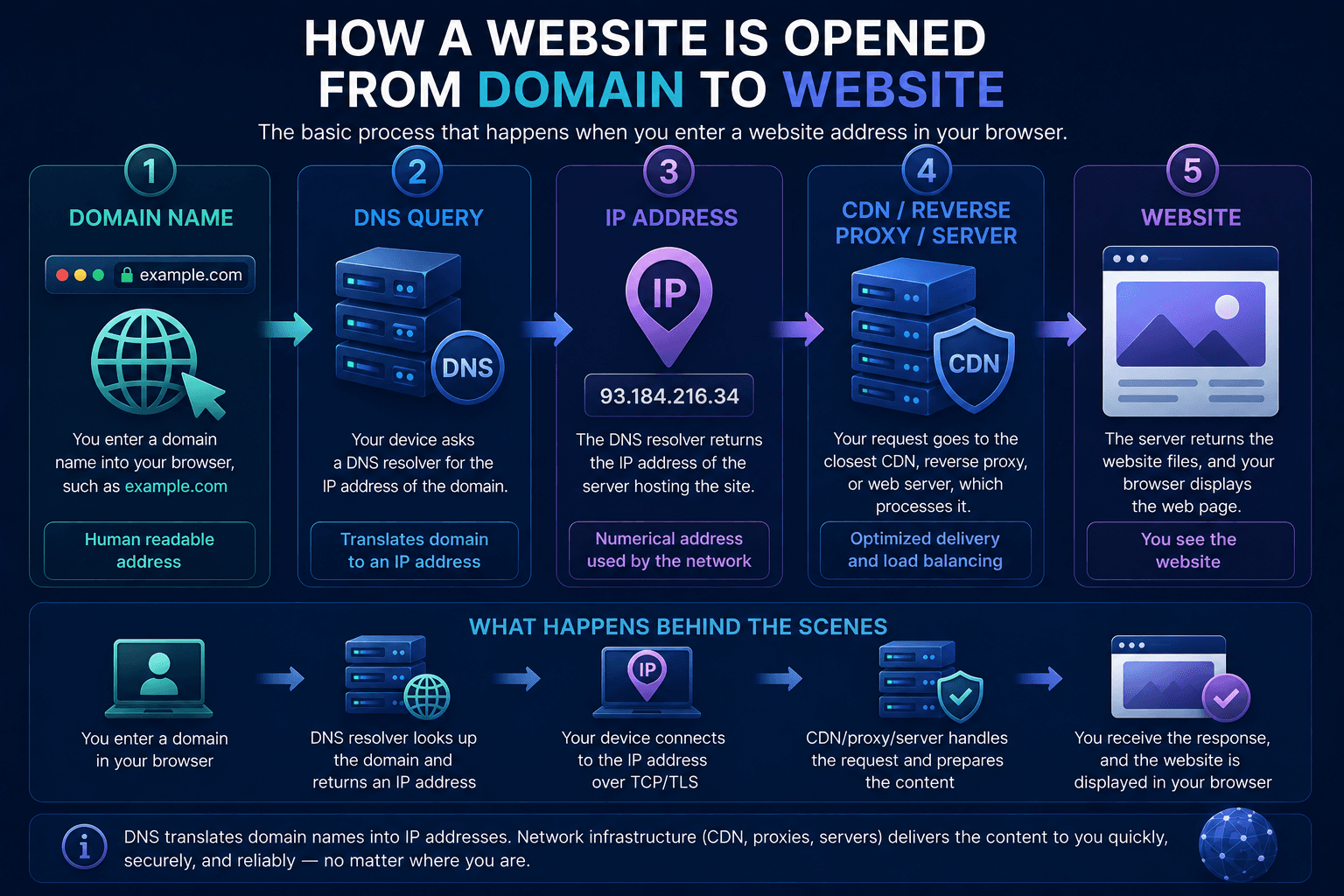
A browser cannot route network traffic directly to a text string such as example.com. It first needs to determine which network endpoint is associated with that domain.
The simplified process looks like this:
Domain → DNS Query → IP Address → Server Connection
For IPv4, DNS typically returns an A record. For IPv6, it returns an AAAA record.
For example:
example.com → DNS → 93.184.216.34
Once the browser receives the address, it can establish a connection to that endpoint.
A useful analogy is to think of the domain as a company name and the IP address as the address used to reach its infrastructure. The name is convenient for humans; the network needs a routable destination.
However, the IP returned by DNS is not necessarily the IP of the physical server hosting the website.
| Parameter | A Record | AAAA Record |
|---|---|---|
| Domain | Domain | Domain |
| DNS record | A Record | AAAA Record |
| Address type | IPv4 Address | IPv6 Address |
| Resolution path | Domain → A Record → IPv4 Address | Domain → AAAA Record → IPv6 Address |
How to Find the IP Address of a Domain
The easiest option is to use a DNS Lookup tool. Enter a domain, and the service queries DNS records to show the IP addresses associated with it.
You can also perform the lookup directly from your operating system.
Windows
Use nslookup to query DNS:nslookup example.com
You can also use:ping example.com
Keep in mind that ping is primarily a connectivity diagnostic tool. Some servers block ICMP requests, so a failed ping does not necessarily mean the website is unavailable.
macOS and Linux
Use dig:dig example.com
Or:host example.com
You can also try:ping example.com
A lookup may return several IP addresses rather than one. This is normal for modern websites.
Large services commonly use Load Balancing, Anycast, CDN routing, IPv4/IPv6 dual-stack infrastructure, and geographic DNS policies.
As a result, the same domain may resolve differently from Germany, Poland, the United States, or through a VPN server in another region.
| Tool | Supported Systems | Main Purpose | Result Type |
|---|---|---|---|
| nslookup example.com | Windows | Query DNS | DNS records and associated IP addresses |
| dig example.com | macOS / Linux | Query DNS | Detailed DNS query results |
| host example.com | macOS / Linux | Query DNS | Domain and associated IP information |
| ping example.com | Windows / macOS / Linux | Connectivity diagnostics | Resolved IP and connectivity result |
Why Can One Domain Have Multiple IP Addresses?
The idea that one domain always corresponds to one server is outdated.
Modern websites often rely on distributed infrastructure consisting of multiple servers and network layers.
A domain may use:
- CDN providers such as Cloudflare, Akamai, or Fastly;
- GeoDNS;
- Load Balancing;
- Anycast;
- IPv4 and IPv6;
- failover infrastructure;
- Reverse Proxies;
- DDoS protection.
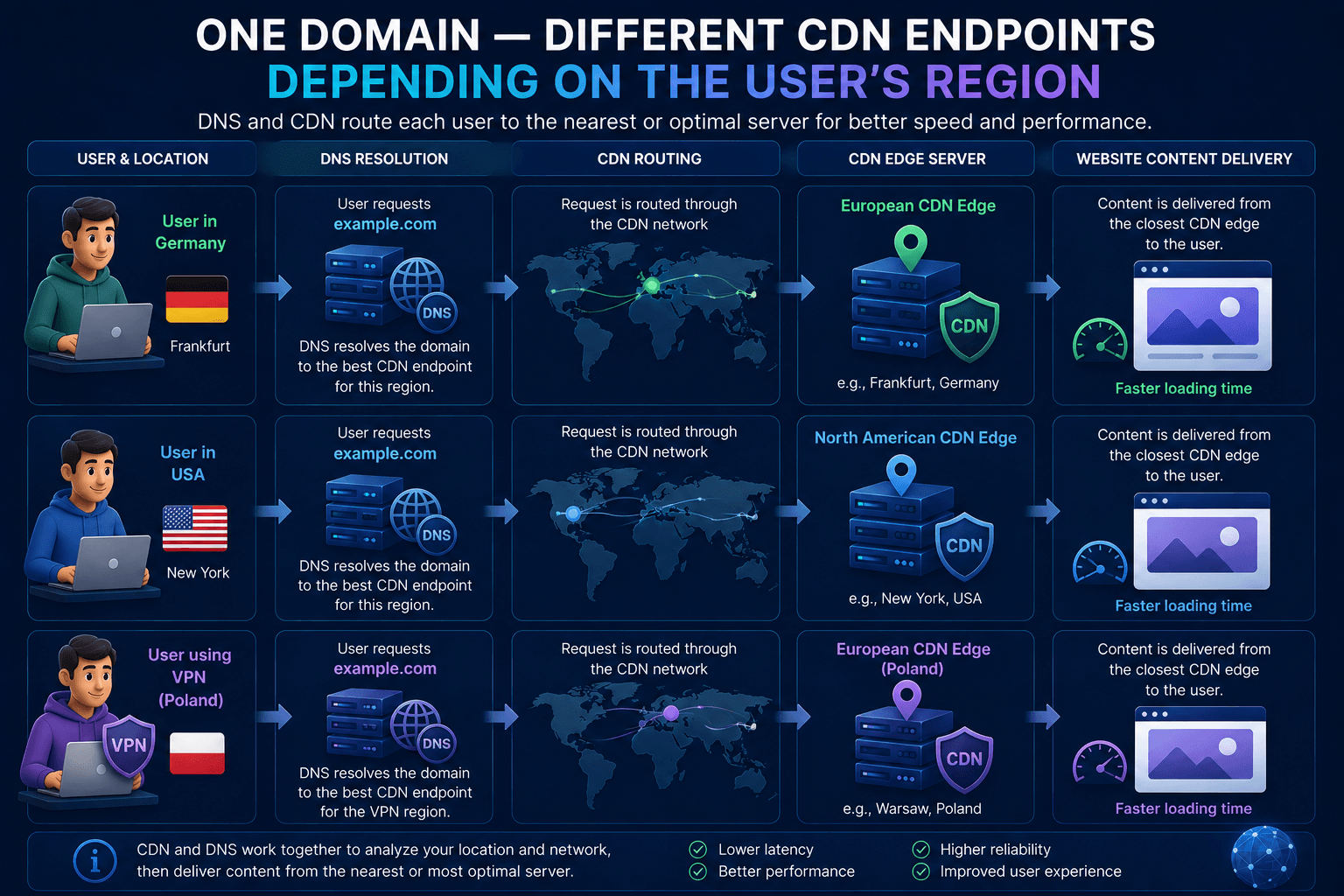
This means two users can request the same domain and receive different destination IP addresses.
For example, a user in Germany may be routed to a European CDN edge, while someone in the United States may receive an IP belonging to a North American edge location.
Both responses can be correct.
The objective is usually to route each connection to infrastructure that provides suitable latency, availability, capacity, or security.
How CDN Infrastructure Affects a Domain IP Address
Many modern websites use a Content Delivery Network (CDN).
A CDN operates distributed infrastructure across multiple geographic locations. Instead of sending every visitor directly to a single Origin Server, the service can route traffic to a nearby or otherwise appropriate edge node.
Providers such as Cloudflare, Akamai, and Fastly use this type of architecture.
A simplified request path may look like:
User → CDN Edge Server → Origin Server
This means a normal DNS Lookup may return the IP address of a CDN node rather than the address of the server where the application or website is physically hosted.
CDNs can improve:
- latency;
- availability;
- traffic distribution;
- resilience;
- security.
This distinction becomes important when analyzing a site’s infrastructure because the public DNS result does not necessarily reveal the complete backend architecture.
Is a Domain IP the Real Server IP?
Not necessarily.
Many websites place a CDN or Reverse Proxy between visitors and the Origin Server.
A simplified direct architecture looks like this:
Domain → Origin Server
With a CDN or Reverse Proxy, it may instead look like:
Domain → CDN / Reverse Proxy → Origin Server
When you perform a DNS lookup in the second case, the returned address may belong to Cloudflare or another intermediary rather than to the Origin Server itself.
This architecture can provide:
- faster content delivery;
- Load Balancing;
- DDoS protection;
- traffic filtering;
- improved availability;
- reduced direct exposure of the Origin Server.
Therefore, the IP returned for a domain is better understood as a public network endpoint rather than automatically assumed to be the physical hosting server.
| Parameter | Direct Connection | CDN / Reverse Proxy |
|---|---|---|
| Architecture | Domain → Origin Server | Domain → CDN / Reverse Proxy → Origin Server |
| Intermediary | None | CDN / Reverse Proxy |
| Origin Server connection | Direct | Through CDN / Reverse Proxy |
Why Can a Domain IP Change When You Use a VPN?
A VPN changes the network path between your device and the internet. Depending on the VPN configuration, it can also change which DNS resolver handles your requests.
This matters because many CDN and DNS systems use geographic routing.
Without a VPN, a user in Germany might receive an IP for a nearby European CDN edge.
After connecting to a VPN server in the United States, the same domain may resolve to an American CDN endpoint instead.
For example:
Without VPN:
User → European Network → European CDN Edge
With VPN:
User → VPN Server in US → US CDN Edge
The domain has not changed. The infrastructure has simply selected a different endpoint based on the network path, DNS resolver, or apparent region.
This is normal behavior for geographically distributed websites.
| Parameter | Without VPN | With VPN |
|---|---|---|
| User location / route | User in Germany | User → VPN Server in US |
| VPN server | None | VPN Server in US |
| CDN endpoint | European CDN Edge | US CDN Edge |
| Routing path | User in Germany → European CDN Edge | User → VPN Server in US → US CDN Edge |
Domain IP Address vs Your Public IP Address
These two concepts are easy to confuse.
Your public IP address identifies the network endpoint from which your internet traffic reaches external services.
A Domain IP Address identifies an endpoint to which traffic for a particular domain is routed.
For example:
Your public IP:198.51.100.25
example.com:93.184.216.34
The first address describes where the request appears to come from.
The second describes where the request is going.
When you connect to a VPN, your visible public IP normally changes to the VPN server’s IP. The IP returned for a website may also change if its DNS or CDN infrastructure uses geographic routing.
| Parameter | Public IP | Domain IP |
|---|---|---|
| What it represents | Network endpoint from which the connection reaches the internet | Destination endpoint returned by DNS for a domain |
| Where it comes from | User’s network connection or VPN server | DNS resolution for the domain |
| Role | Describes where the request appears to come from | Describes where the request is going |
| VPN impact | Normally changes to the VPN server’s IP | May change if DNS or CDN infrastructure uses geographic routing |
Domain IP Address, DNS, and Privacy
Checking a domain IP is not useful only for developers and network administrators. DNS resolution can also provide useful context when troubleshooting VPN and privacy configurations.
A VPN primarily changes the network path and the public IP visible to external services. With a properly configured connection, DNS should also follow the intended routing policy rather than unexpectedly using an unrelated resolver outside the VPN path.
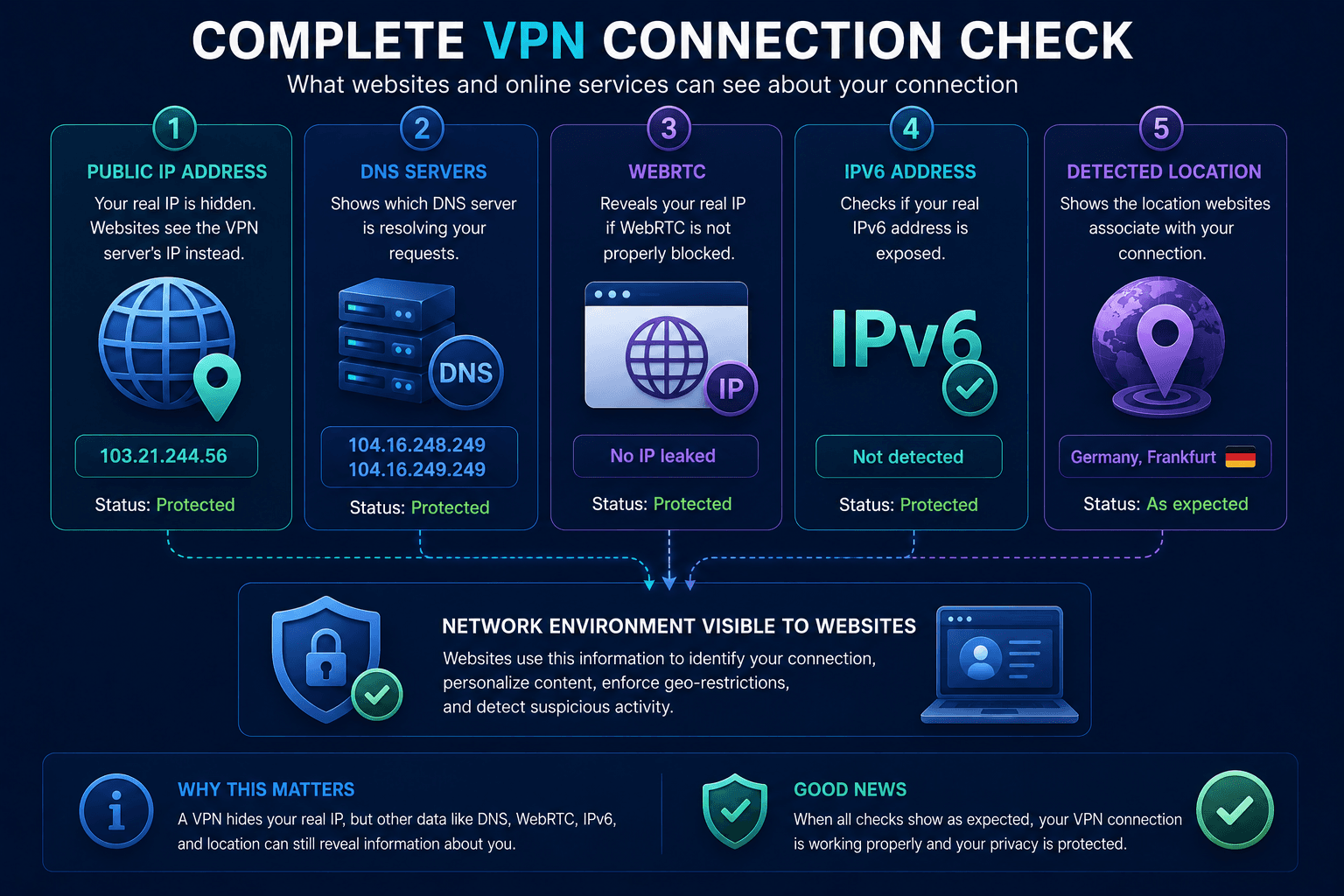
After connecting to a VPN, it can therefore be useful to check:
- public IP;
- DNS servers;
- WebRTC;
- IPv6;
- detected network location.
A diagnostic service such as Whoer can help show which of these network and browser signals are visible from the outside.
If the public IP belongs to the VPN server but DNS, WebRTC, or IPv6 unexpectedly exposes information associated with the original connection, the configuration may need further investigation.
Why Domain IP and DNS Matter for Security Systems
Network information can also contribute to how websites evaluate a connection.
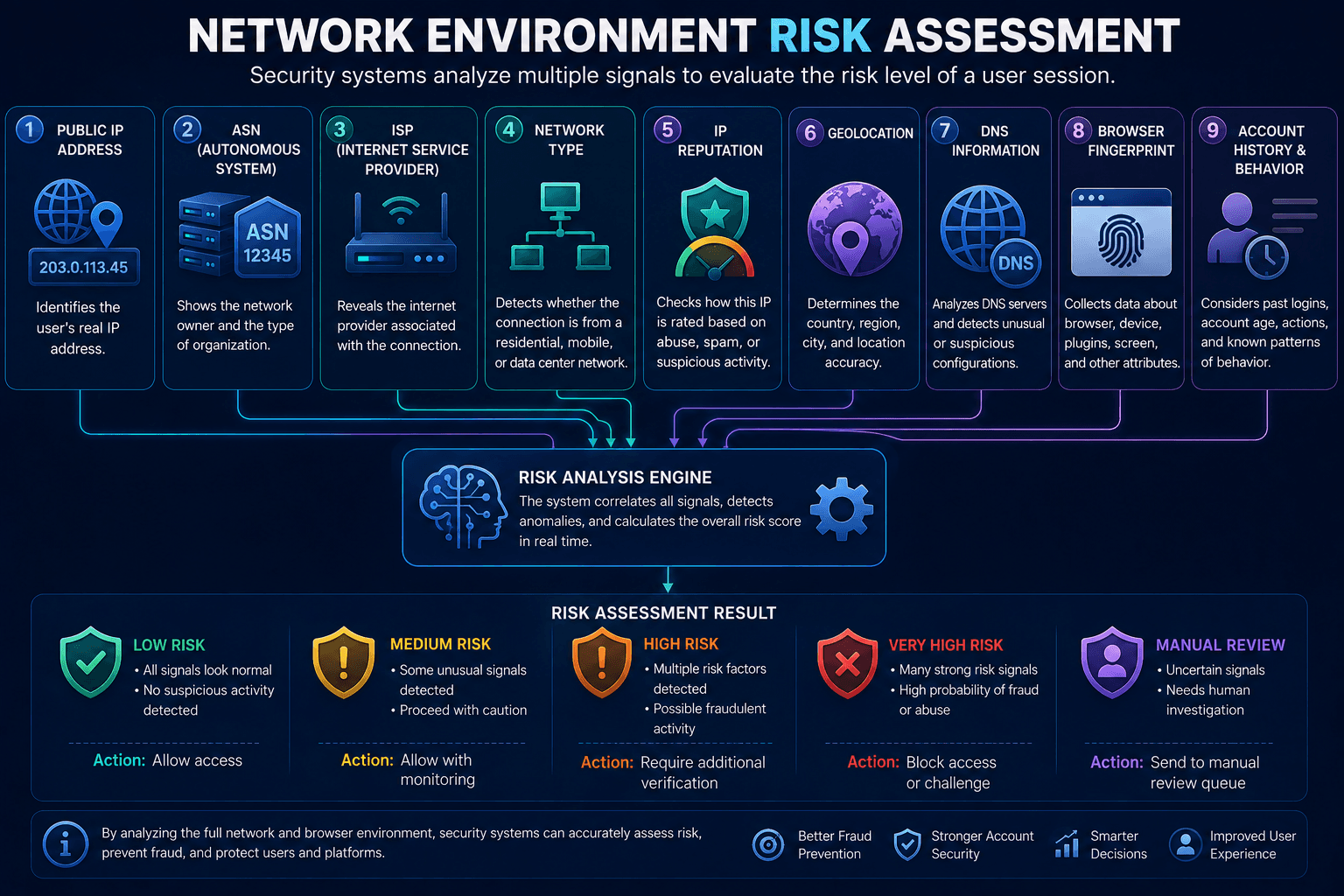
Depending on the platform, security and anti-fraud systems may consider signals such as:
- public IP;
- ASN;
- ISP;
- network type;
- IP Reputation;
- IP geolocation;
- DNS characteristics;
- Browser Fingerprint;
- account history.
No single signal necessarily determines whether a connection is considered suspicious.
Instead, modern risk systems can combine multiple indicators to evaluate the overall context of a session.
For example, a sudden change in IP country combined with other unusual environmental changes may result in additional verification.
That does not mean that changing DNS or using a VPN is inherently suspicious. It simply means network information can be part of a broader risk assessment.
How to Check a Domain IP Correctly
The right diagnostic method depends on what you are trying to verify.
If You Need the IP Address of a Domain
Use:
nslookup;dig;host;- a DNS Lookup service.
These tools query DNS and help determine which network endpoints are currently associated with the domain.
If You Need to Check Your Own Network Environment
After connecting to a VPN, look at:
- public IP;
- DNS;
- WebRTC;
- IPv6;
- ASN;
- IP geolocation.
These are two different layers.
A VPN may correctly route your traffic through the selected server while a website’s CDN returns a different destination IP based on your new region.
Both behaviors can occur at the same time without indicating a problem.
The key is to determine which part of the network path you are actually testing:
- Domain IP → DNS resolution;
- Public IP → source of your connection;
- DNS servers → resolver path;
- VPN routing → network exit point;
- CDN IP → destination selected by distributed infrastructure.